
What’s for Dinner?
Context-aware mobile cooking assistant
ROLE
Solo UX Designer
TIMELINE
2 weeks
PROJECT TYPE
Personal project - consumer mobile app
TOP SKILLS
AI-assisted workflow
E2E design
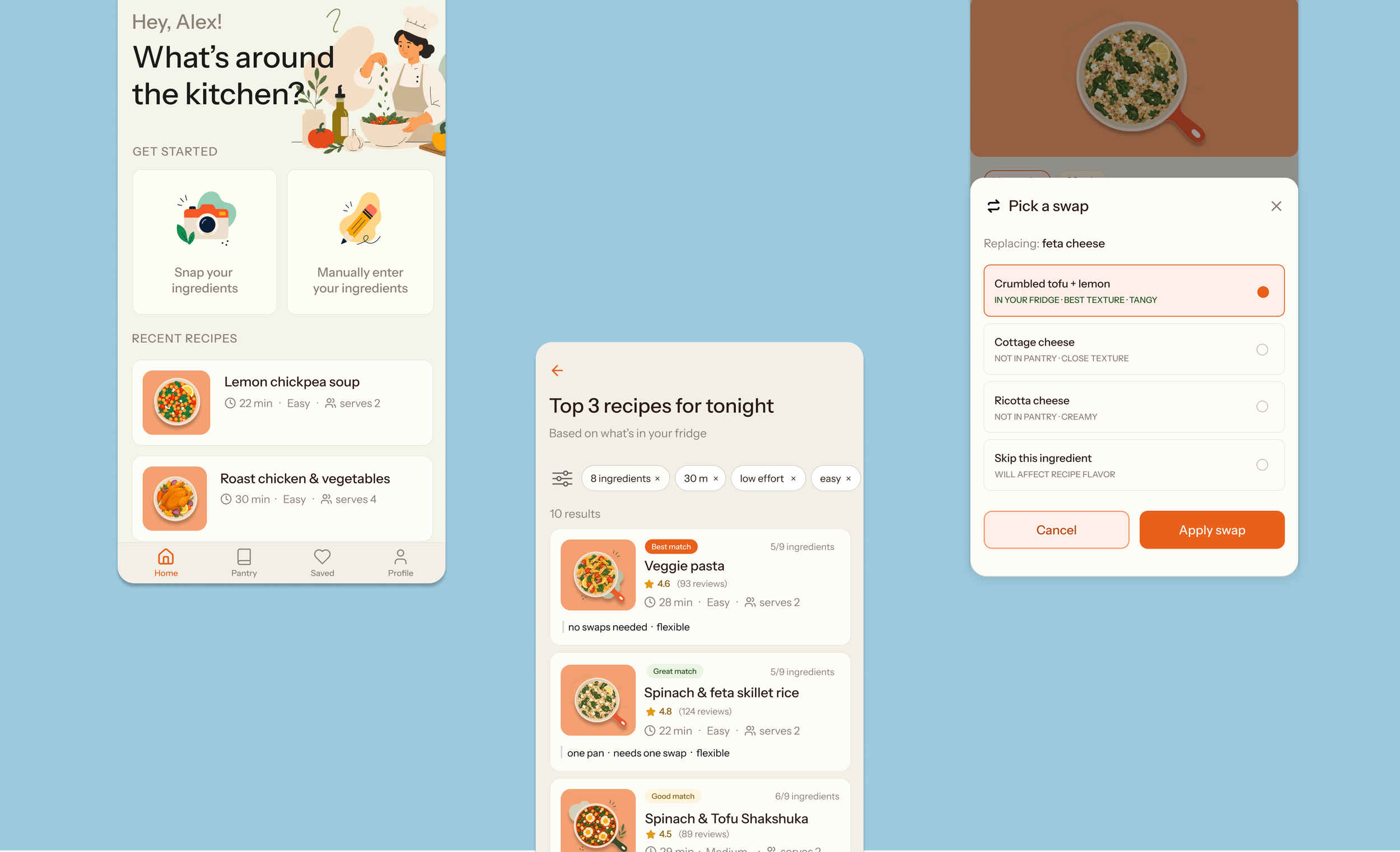
01 - OVERVIEWI explored how AI could reshape and accelerate the UX design process by designing an end-to-end consumer-facing mobile cooking assistant focused on a highly common and frequent problem: difficulty deciding what to make from ingredients they already have. I delivered an interactive HTML prototype using AI assistance.
People feel stuck meal planning due to the cognitive overload of decision-making
PROBLEM SPACEMeal planning and cooking is a daily problem. People decide to cook due to a number of reasons stemming from health to cost. However, they often lack the tools and structure to cook consistently and efficiently. This happens because people struggle with cognitive overload due to every decision in meal planning being a balance in constraints like time, ingredients, energy, and cravings.
Recipe-first workflows require users follow structured steps or have exact ingredients on
hand. Missing one ingredient often caused recipe abandonment and “quick recipes” still feel
mentally or physically demanding.
Ingredient-first workflows are more common but people struggle to map disconnected ingredients into viable meals. People often feel stuck because they lack confidence in knowing ingredient substitutions, meal combinations, or effort required.
02 - SOLUTIONIngredient-to-meal assistant that bridges the gap between “what I have” and “what I can realistically make”
My solution is a context-aware ingredient-to-meal assistant that meets users where they are. Rather than relying solely on rigid recipes, this solution on the back-end combines recipe search, adaptive meal frameworks, and intelligent substitutions to help users cook flexibly with incomplete ingredients, limited time, and varying energy levels.
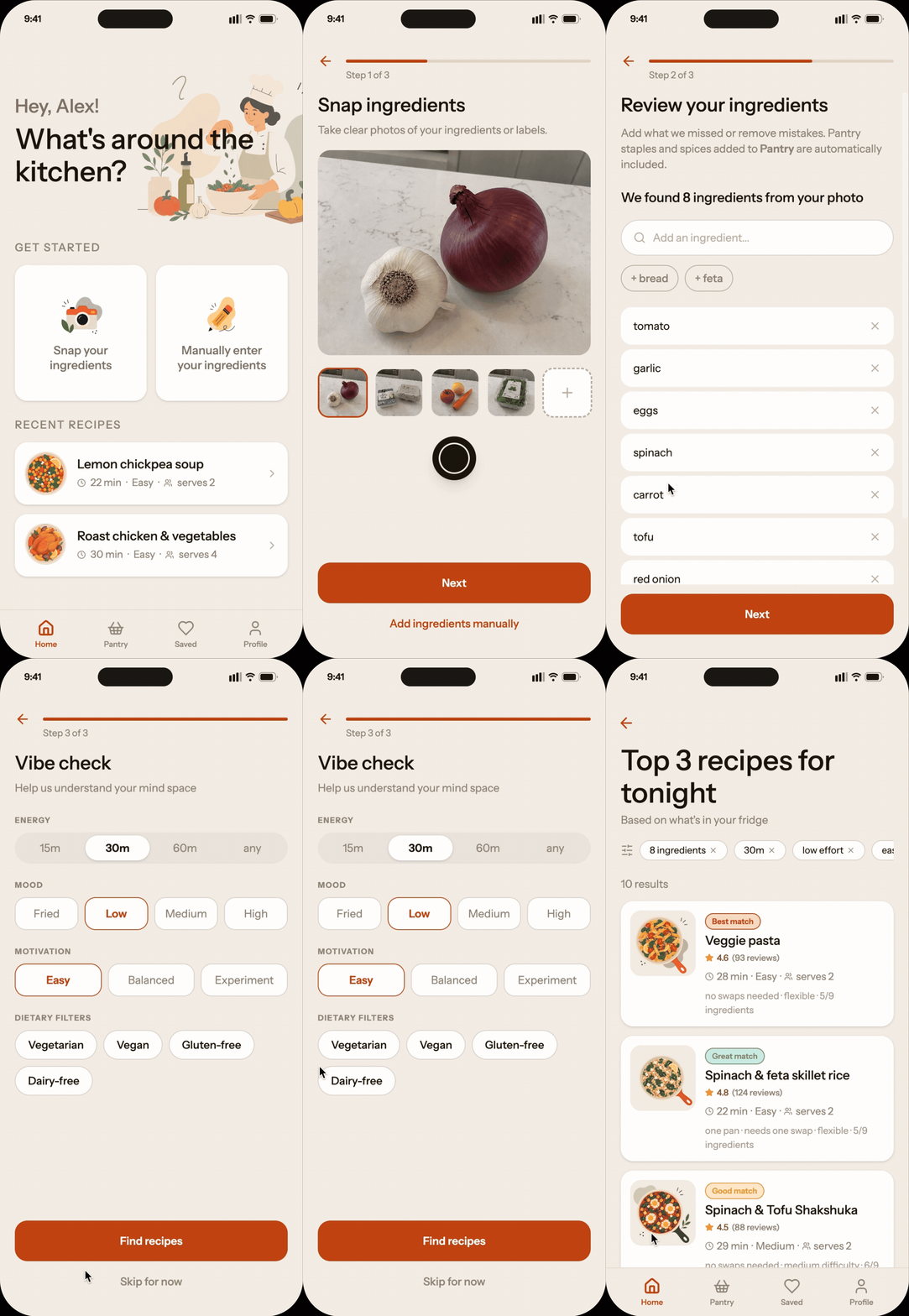
CORE FLOWSUsers can quickly snap the ingredients they have, review them, and input their energy & motivation choices, before receiving 3 top results.
The results will denote the best matches, what may need a substitution, and timing for easy decision-making.
Flow 01 - Adding ingredient & motivation inputs
Meet users where they are
Reduce cognitive load
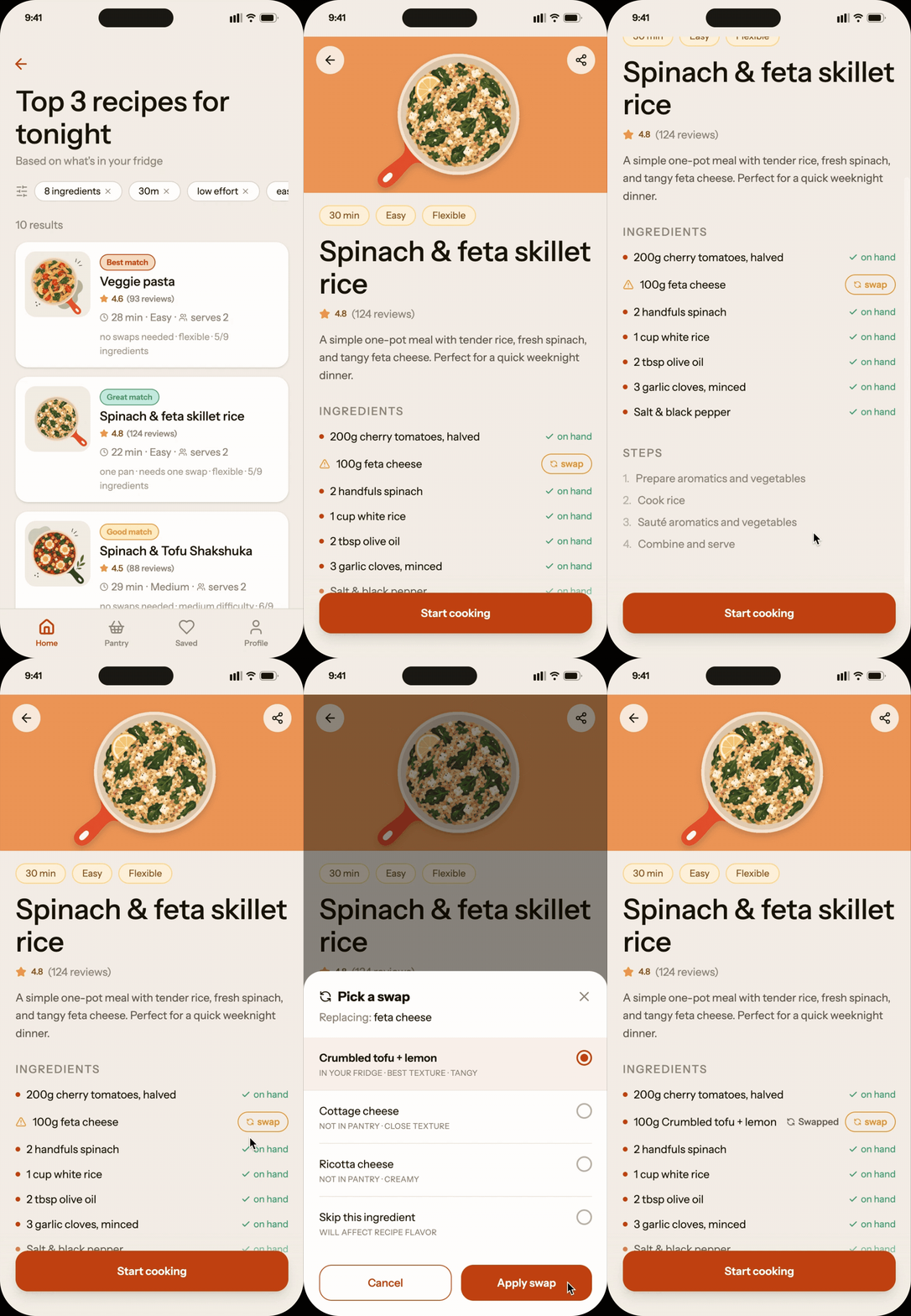
Flow 02 - Swapping out ingredients
If an ingredient isn’t available, the system will suggest alternatives, prioritizing pantry or ingredient items that are available. Users are able to easily swap the ingredient out.
Prioritize flexibility
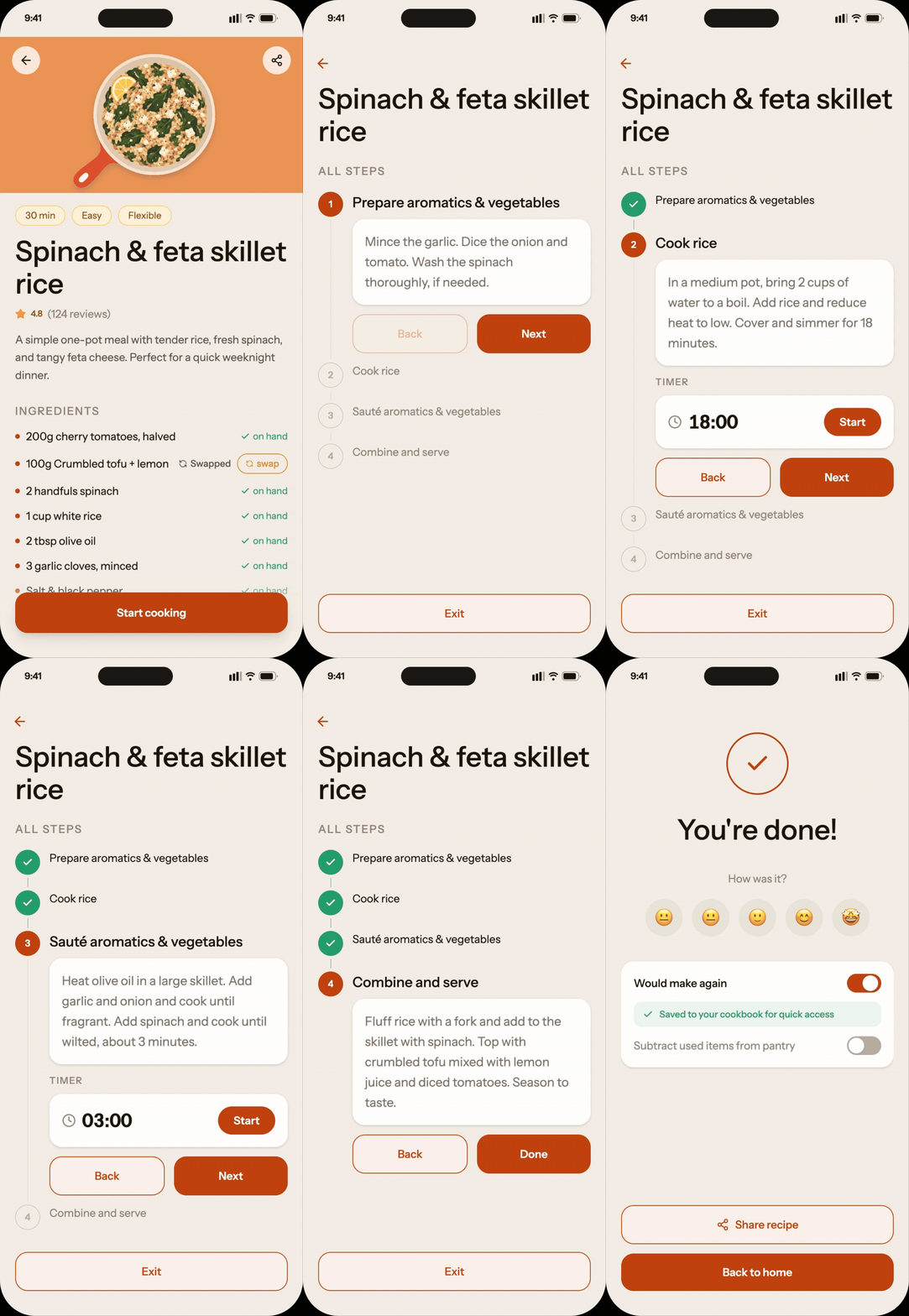
Flow 03 - Cooking with guidance
Build confidence through reassurance
Users will be guided via cook mode that will walk them through each step.
03 - DISCOVERYIteratively refined my research prompts to be exploratory, neutral, and include edge cases
PROMPT ENGINEERING & RESEARCHTo explore the space quickly, I used AI-assisted prompting to generate and synthesize large amounts of research around daily meal preparation behaviors. Early on, I realized prompt framing dramatically affected the research outputs and had to refine a few times before getting the output I wanted. I also included prompts to uncover extremes and exceptions to better understand the problem area’s outliers and edge cases.
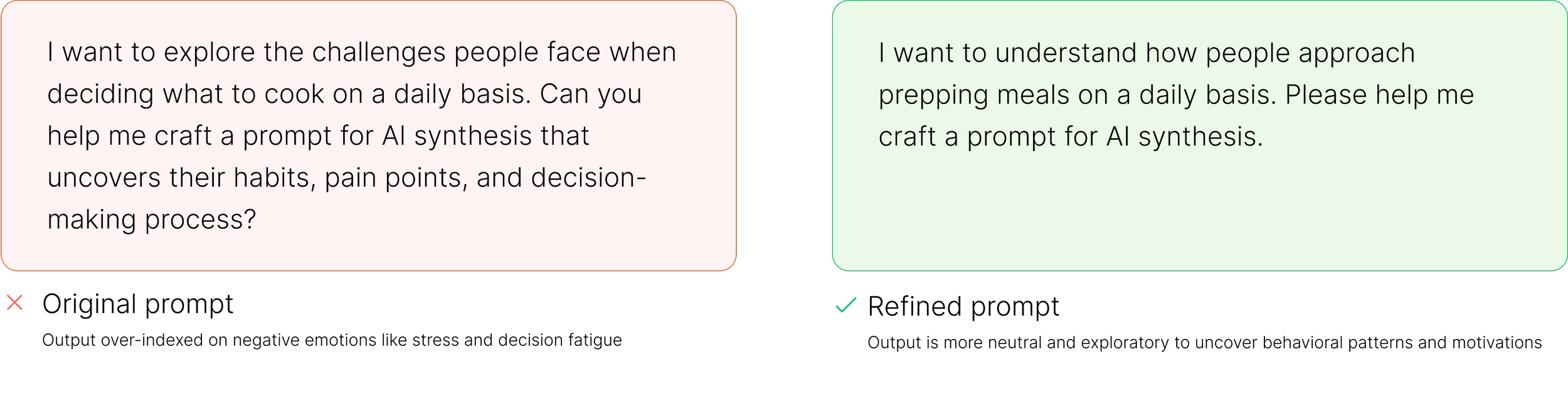
The output of the research was extensive and overwhelming so I used AI to help surface themes, cluster insights, and identify patterns. I manually evaluated and filtered outputs since some of the insights felt generic or unrealistic.
Synthesized large-scale research with AI and refined insights through a human lens
SYNTHESIS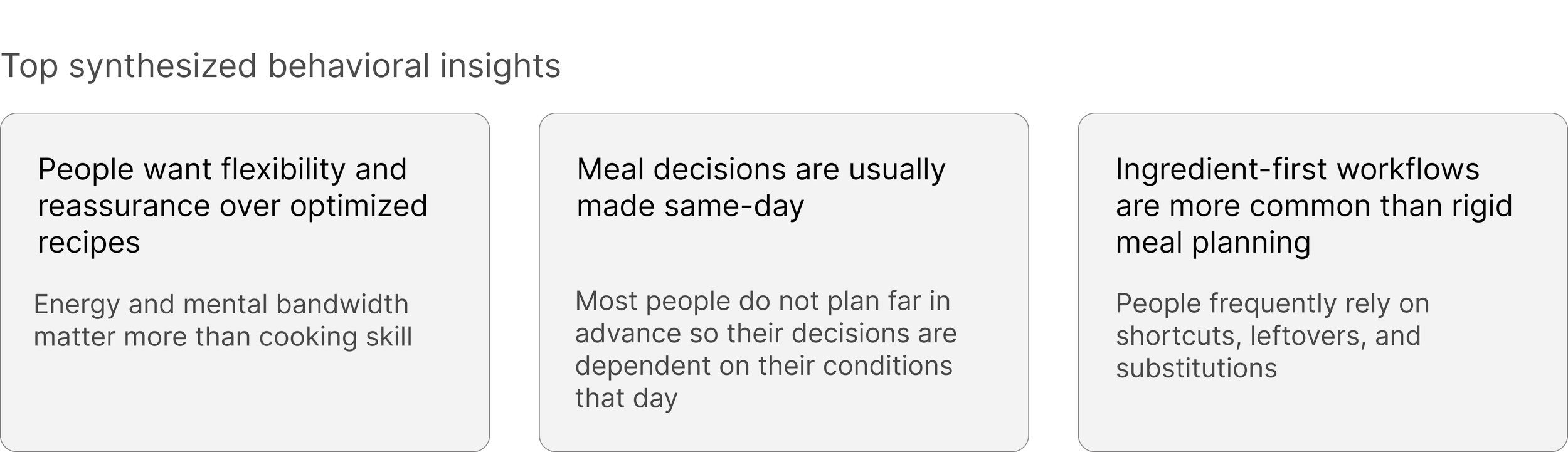
04 - DEFINING THE PROBLEM SPACEConverged broad exploration into opportunity from an insight
The strongest direction emerged from one of the problem statements: users need help translating imperfect ingredients into familiar meal patterns. It:
Addresses some of the underlying problems from the other opportunity areas
Supports many different entry points of the journey, i.e. whether a user was grocery shopping and inspired by a specific ingredient, or trying to avoid food waste with limited ingredients left at home.
SOLVING THE RIGHT PROBLEMI asked Claude to convert the synthesized opportunity areas within the cooking/ meal planning space into problem statements and evaluate them based on frequency of the problem, level of friction, and breadth of users impacted. As I explored potential concepts, a lot of them felt either too generic or not realistic.
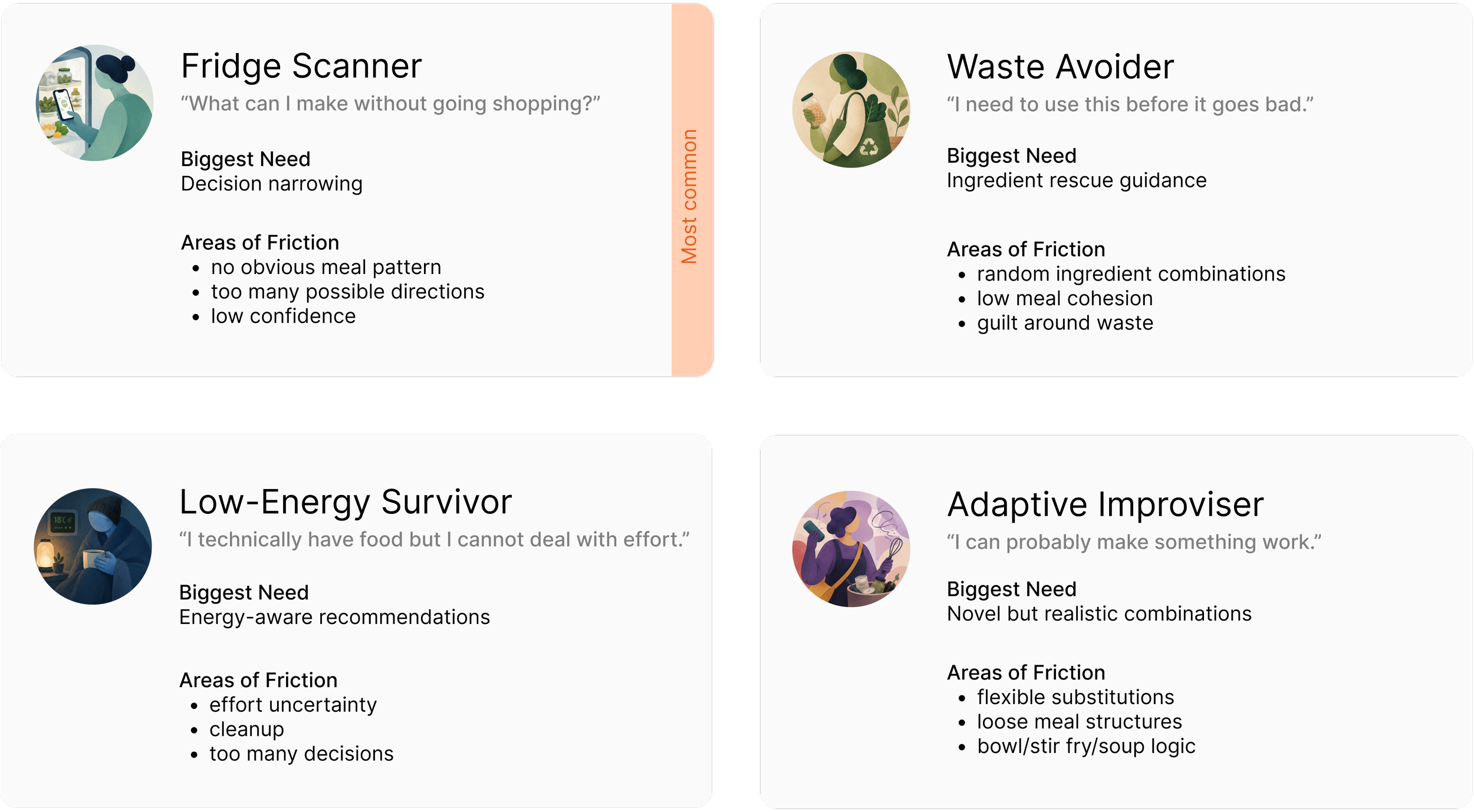
WHO ARE WE DESIGNING FOR?05 - EXPLORING THE PROBLEM AREADiverged to explore and understand the ingredient-to-meal translation space
EXPLORATIONEvaluated divergent concepts to identify the strongest product opportunity.
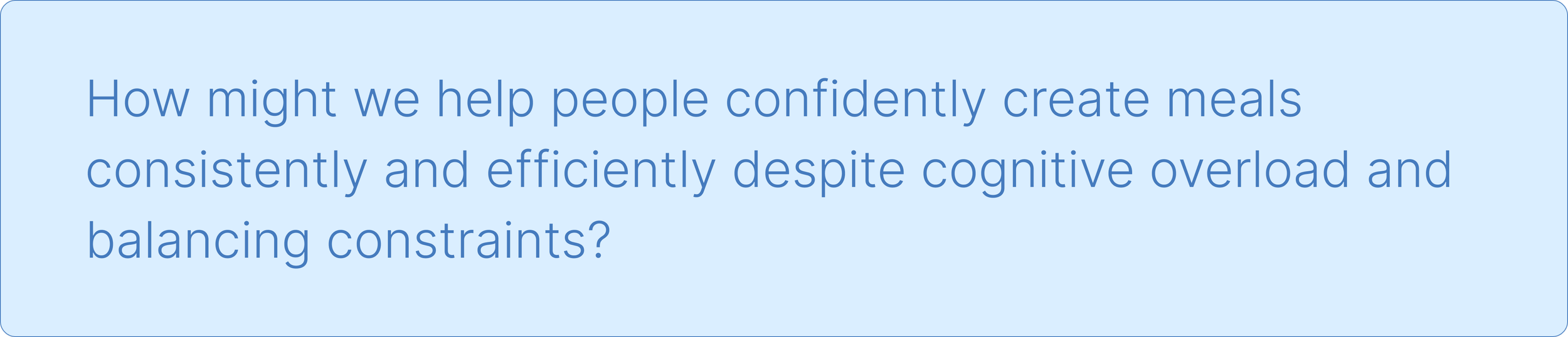
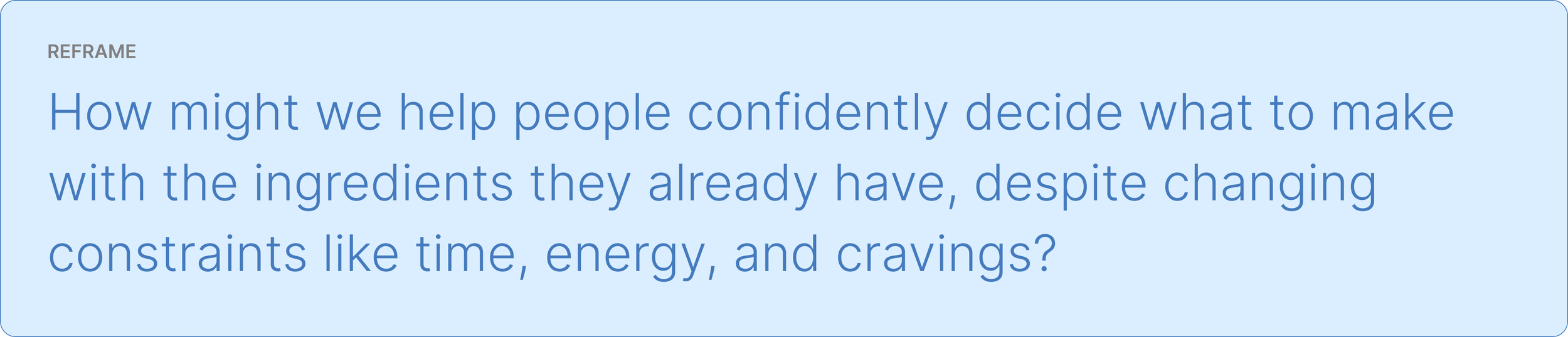
After deciding on a opportunity area, I reframed our “How Might We” statement to be more specific.
With the user archetypes synthesized, I was able to understand and empathize with the pain points and user needs of each.
06 - IDEATIONNARROWING THE OPTIONSIdentified promising concepts and pressure-tested product strategy
I had AI rapidly explore multiple product directions within the selected problem space by generating contrasting approaches, exploring edge-case scenarios, and identifying failure modes for each concept.
As I explored different product directions, I found that many of the concepts did not feel sufficiently differentiated or grounded in a strong user need. For example, the idea of an “AI Meal Decision Copilot” felt too similar to using an AI chatbot, while the “Pantry Intelligence Layer” concept introduced a level of technical and maintenance complexity disproportionate to the value it delivered.
One direction that stood out, however, was the idea of reusable meal frameworks which would be adaptable meal structures that users could flex based on available ingredients, energy levels, cravings, and constraints. I continued exploring this direction with more questions to better understand how the framework could support different user contexts and behaviors.
I then combined aspects of this idea with concepts I had already been independently exploring and asked Claude to pressure-test the strategy. The feedback was surprisingly constructive—it highlighted potential risks, failure points, and areas where the experience could break down, while also suggesting opportunities to sharpen the product definition and strengthen the core value proposition.
Understanding the user archetypes gave me guidance of what we needed to solve the user needs.
PRODUCT PRINCIPLES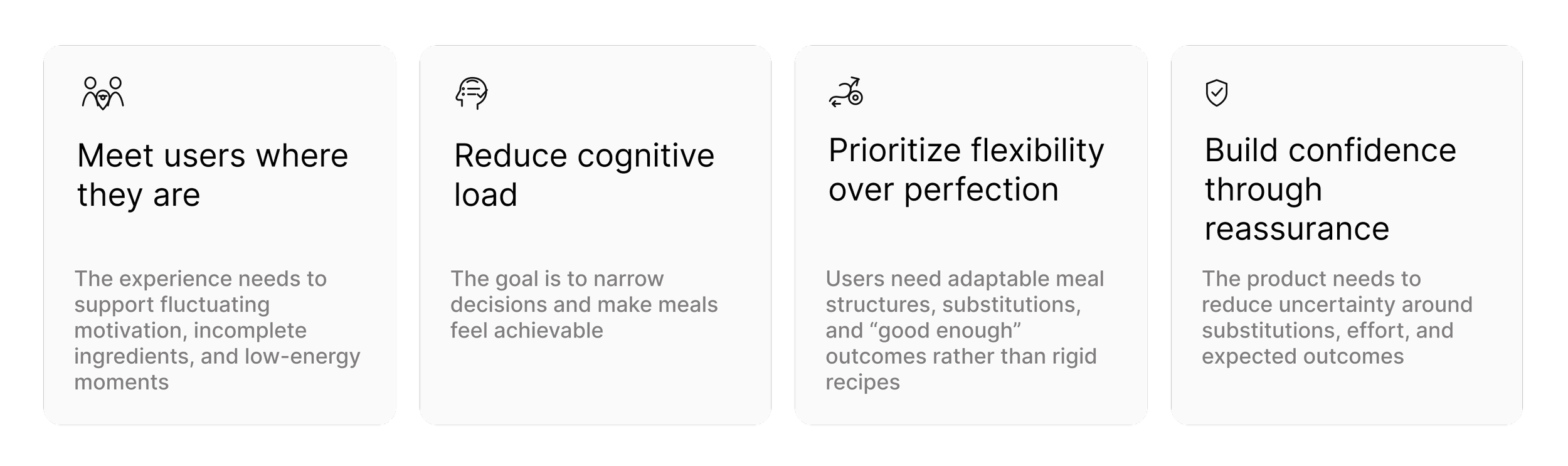
A context-aware ingredient-to-meal assistant that helps users make low-friction cooking decisions with incomplete ingredients, limited energy, and real-world constraints. Rather than relying solely on rigid recipes, the system combines recipe search, adaptive meal frameworks, and intelligent substitutions to help users cook flexibly with incomplete ingredients, limited time, and varying energy levels.
SOLUTIONTRANSLATING PRODUCT DEFINITION TO USER FLOWSConverting Jobs to be Done to user journey flows
Blueprinting helps me ideate and see the bigger picture of what is happening at any given point of the user journey across channels.
Once I identified the product direction, I researched the competitive landscape to understand how saturated the space already was, what existing solutions were doing well, and where meaningful gaps still existed. I found that very few existing apps deeply solve the user problem above. The closest one is a recipe search engine where users can search recipes based off ingredients; but again, it is static and not adaptive or flexible. This validated out unique opportunity to meet users where they are.
COMPETITIVE RESEARCH07 - DESIGN EXECUTIONIteratively evaluated AI-generated UI wireframes through a UX heuristic lens
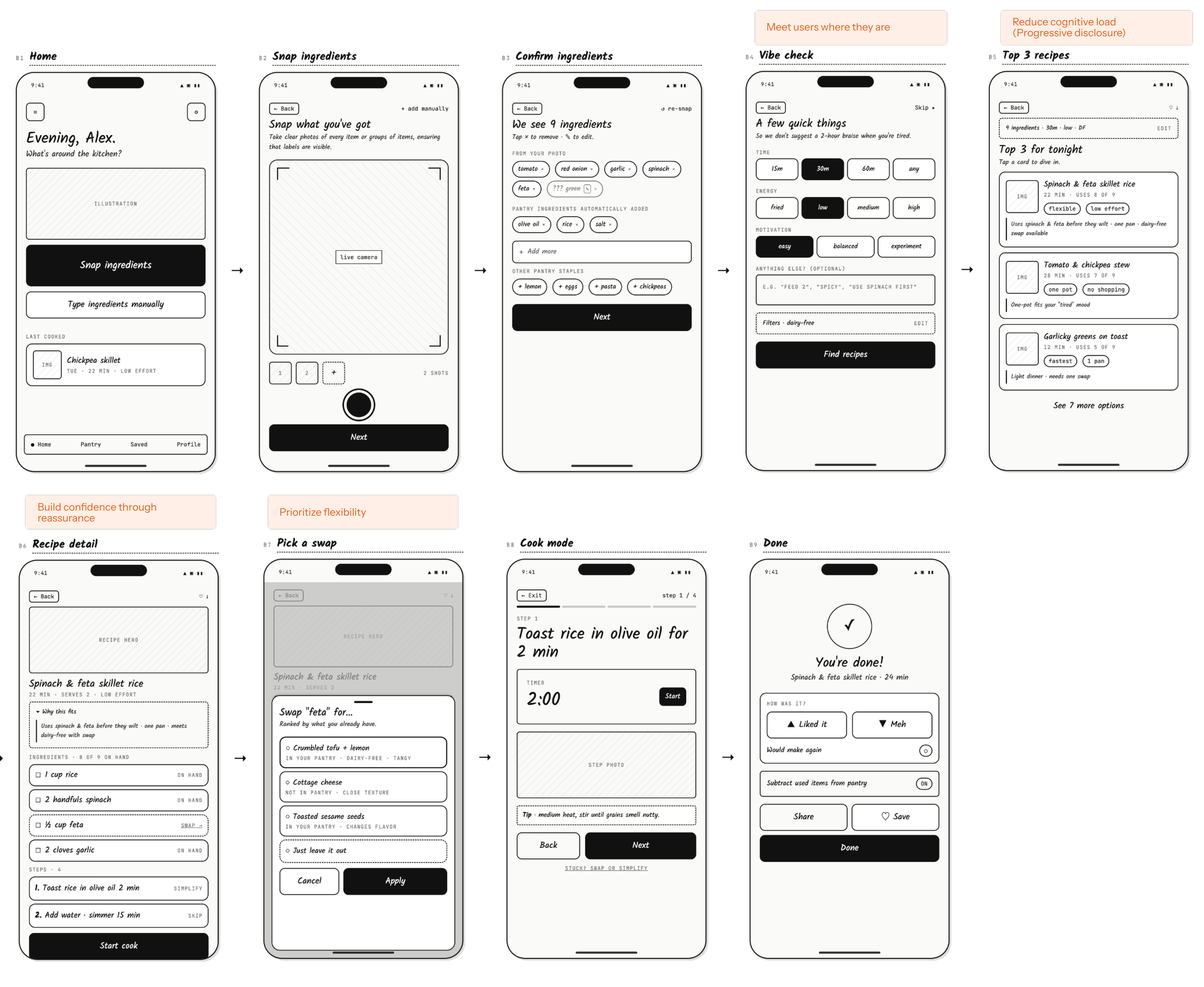
WIREFRAMESI experimented with several AI-assisted UI generation tools to understand how each translated product ideas into interface design. The quality of the outputs varied:
Figma MCP struggled with layout structure, hierarchy, UX clarity, and copy.
Figma Make’s interaction patterns and visual fidelity felt too low-fi for what I was looking for
Claude Design produced the strongest interaction patterns, layouts, and visual direction overall, so I used it as the primary design exploration tool
I treated the generated wireframes as starting points where I evaluated each screen through a UX and heuristic lens, identifying issues related to usability, hierarchy, cognitive load, and flow continuity. I then used targeted prompting to iteratively refine everything from the layout to the interactions, to the copy.
AI-ASSISTED FEEDBACK ITERATIONS
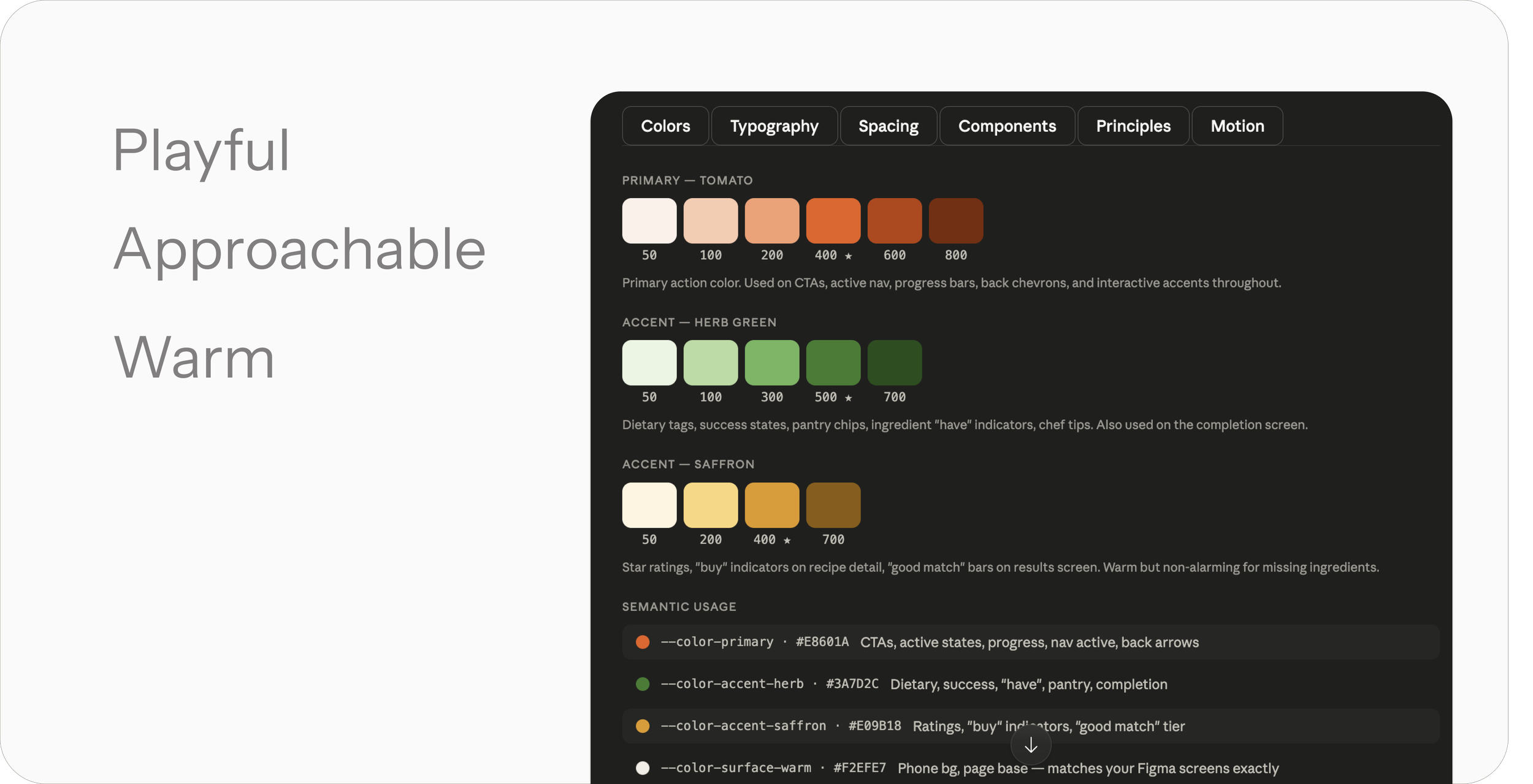
DESIGN SYSTEMI wanted the visual design to help users feel encouraged during moments of stress or decision fatigue. As with the rest of the project, I used AI as a starting point. Claude helped generate an initial design system based on visual references, which I then refined in Figma.
DESIGN SYSTEM TO MOCKUP TRANSLATIONDue to tooling limitations, I generated the design system in Claude, and imported into different AI tools as HTML to create an interactive prototype.
Figma Make produced stronger navigation and interactions, but the visual styling required significant refinement.
Figma MCP x Claude generated layouts and visual treatments that were closer to the desired direction, but the interactions were not as robust.
08 - REFLECTIONThis particular project was a solo end-to-end exploration of using AI throughout the design process. However, I know that my process may change in other contexts such that AI may be applied more strategically at high-impact stages, resulting in a different workflow.
AI-ASSISTED WORKFLOWLooking back, AI significantly shifted where my time and effort were spent compared to my traditional workflow:
Faster longitudinal research and synthesis - Discovery & synthesis could be done quickly through structured prompting
Expanded exploration — Ability to rapid test and explore of multiple directions easily
Earlier pressure testing — Concepts could be stress-tested earlier before investing in design execution
Curation — My role moved from generating ideas to evaluating, filtering, and refining them
My workflow became more iterative and non-linear with continuous validation loops.
AI was very helpful in some areas in getting started with a baseline to work off of. However, I still needed to be there to orchestrate the process, iterate on the prompting, evaluate outputs, and make decisions. The most manually involved parts of the design process were the decision making, product definition to user flow translation, and wireframe to visual design translation.
LIMITATIONS OF AIWHAT I’D DO DIFFERENTLY IF I HAD MORE TIMEDo user research to supplement the AI findings
Use prompts to run automated checks for accessibility compliance and for localization
Get usability feedback