
Cloud KMS Autokey
Simplifying enterprise encryption at scale
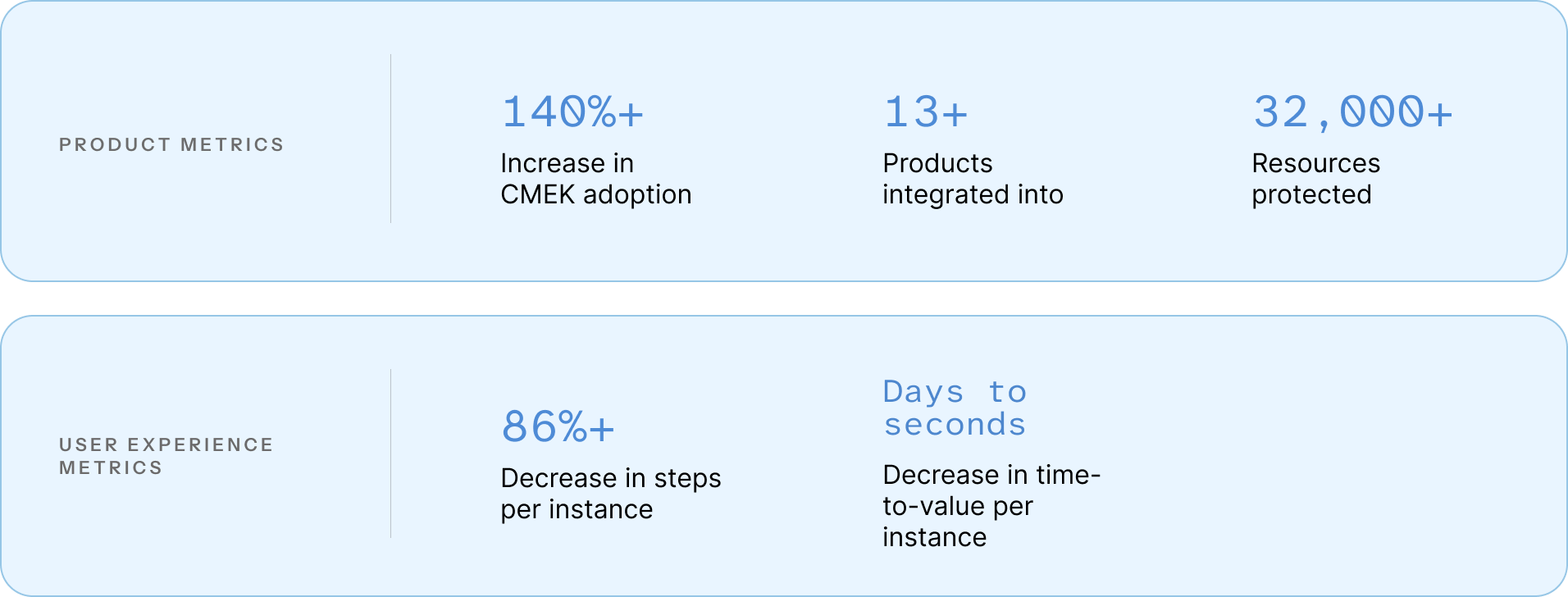
Led UX for Cloud KMS Autokey, a strategic, GCP-wide initiative that reduced CMEK setup from a multi-team workflow to seconds while increasing adoption by 140%.
ROLE
Lead UX Designer
TIMELINE
2023-2024
TEAM
PM, UXR, 2 Eng Tech leads
TOP SKILLS
Product definition, Systems thinking, Influence
01 - OVERVIEWReduced a multi-team, multi-day workflow to seconds, and increased customer-managed encryption key (CMEK) adoption while preserving strict security boundaries.
I led UX for Cloud KMS Autokey, a cross-Google Cloud encryption feature that automates customer-managed key creation. I drove the initiative from early discovery through GA where I aligned stakeholders, advocated through reprioritization, and iterated alongside evolving technical architecture.
IMPACT02 - BACKGROUNDFor some, customer-managed encryption keys are a necessity but they are hard-to-use and clunky
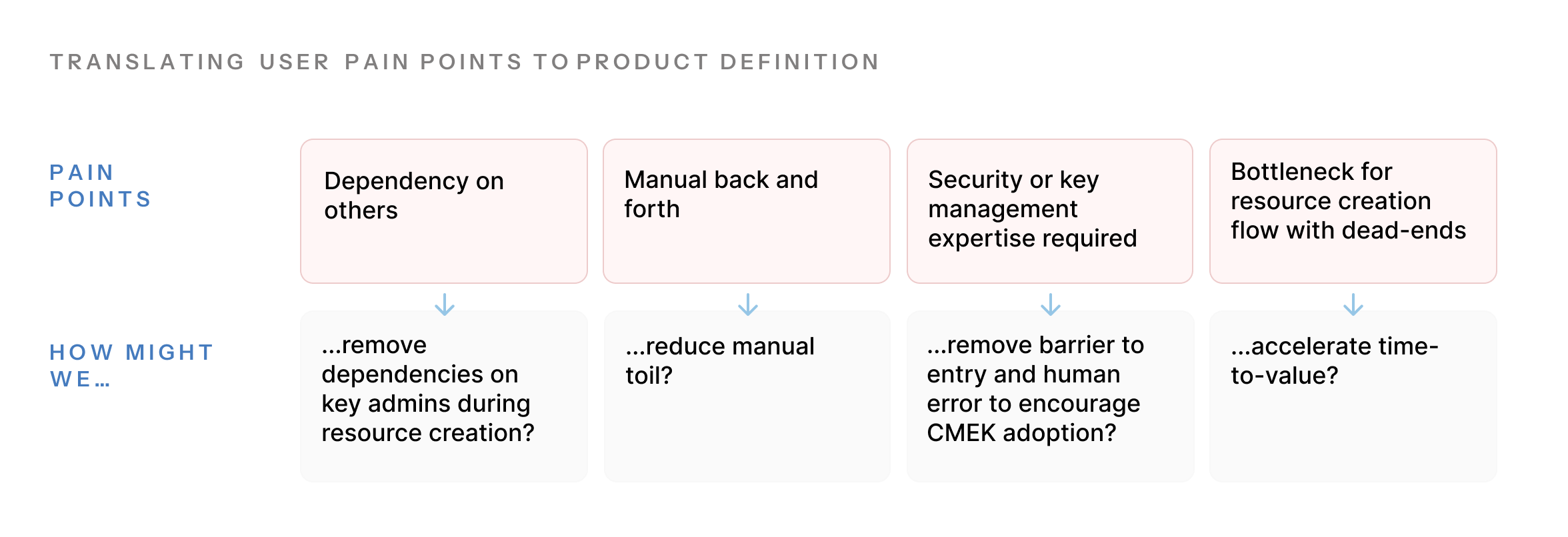
In Google Cloud, all resources (storage buckets, VMs, etc.) are encrypted automatically with Google-managed keys. However, organizations that are in regulated industries or need stricter control, like governments or financial institutions, should and are often required to use, customer-managed encryption keys (CMEK).
CMEKs give users ownership and more control over data-at-rest encryption but require more knowledge and hands-on management. Despite being a requirement for some, CMEK adoption lagged.
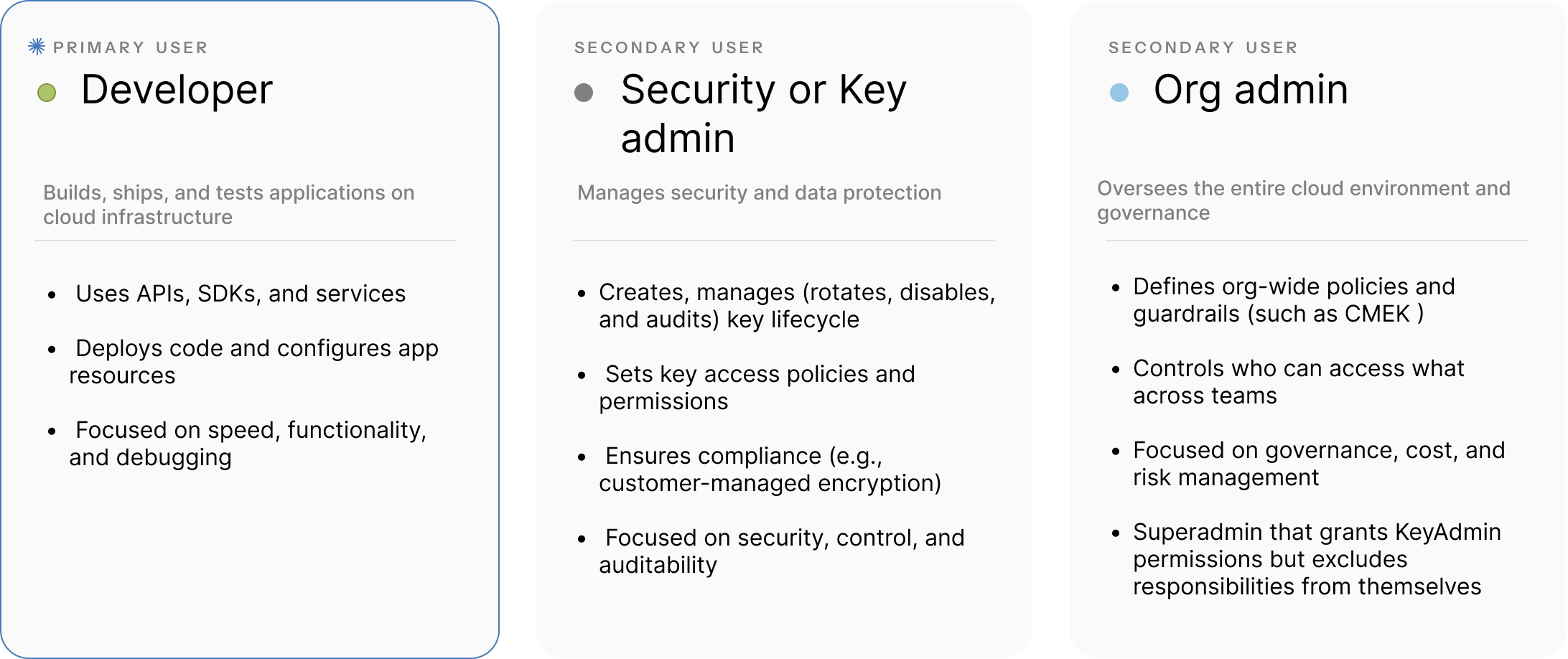
USERSSeparation of duties mitigated security risks, but also introduced heavy coordination overhead
USER PROBLEM & RESEARCH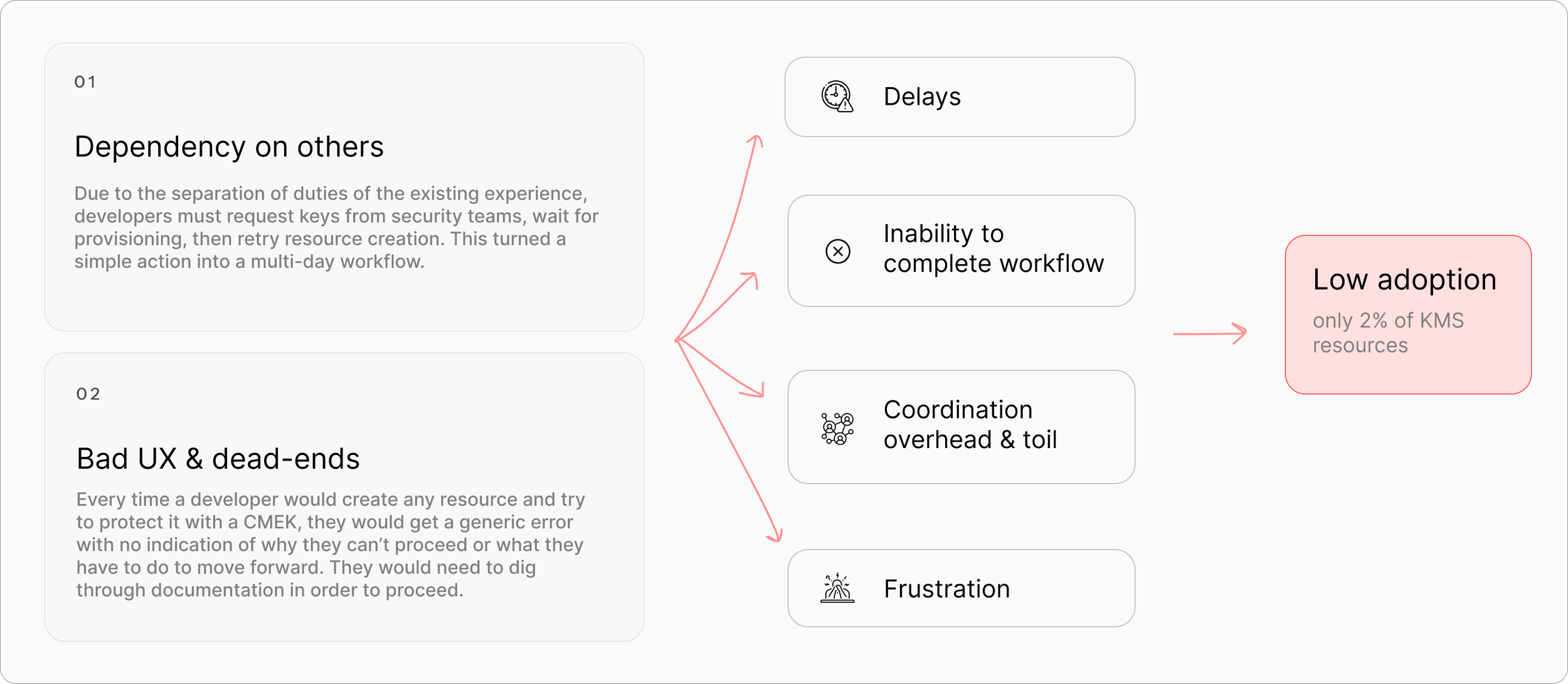
EXISTING USER JOURNEYSCALE OF PROBLEMA repetitive issue at massive scale which compounds into years of lost productivity and frustration
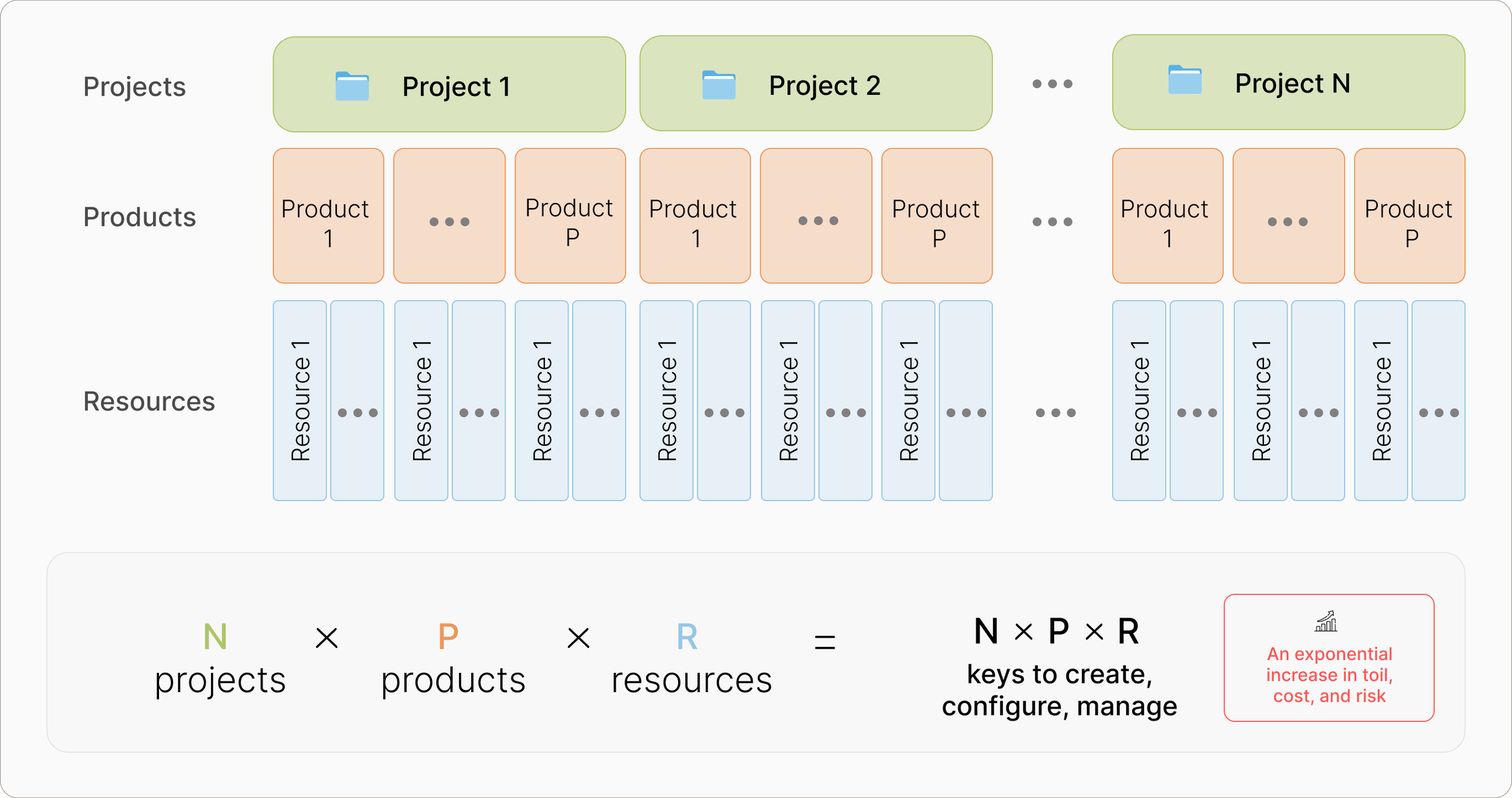
The current workflow creates exponential manual toil due to the frequency of it happening every time a resource is created for every product, and for every project pair. Since encryption touches every resource, it was a GCP-wide problem that happened at least 100,000 times a year. It also greatly impacted individual organizations as one company found that this would need to be done 1800 times a year, “..added up, this would create multiple years of work for the company.”
OPPORTUNITYExponential increase in revenue related to increase of adoption
At the time, only 2% of KMS resources used CMEK, despite strong demand from regulated customers. Customer-managed encryption keys are more expensive than the default Google-managed encryption as keys are billed per key, and per management operation so each new key is integral to our revenue. By lowering barrier to entry and increasing CMEK adoption, we could quickly increase revenue.
A low-risk, highly requested and anticipated feature
We were able to quickly and easily validate the need for this feature through regularly speaking to our sales team, we learned that:
a GCP-native solution for this toil was “one of the most sought after features” for the Key Management Service product and the “largest barrier to CMEK adoption”
Larger companies had built their own Terraform solutions to automate this toil
Many customers prefer to use a GCP-native solution
03 - SOLUTION
FULL KEY LIFECYCLE - GA RELEASE FINAL DESIGN
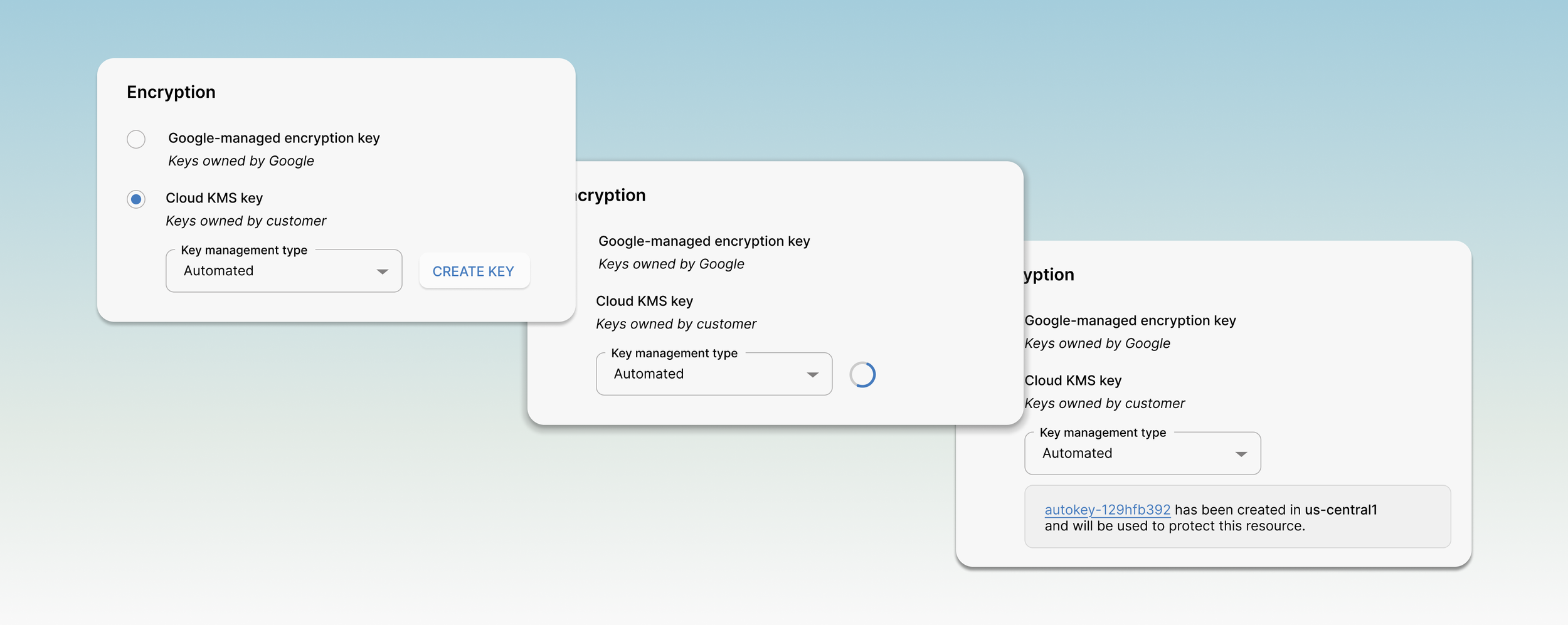
Cloud KMS Autokey is a mechanism that allows developers to automatically create and assign a new customer-managed encryption key, aligned to Google best practices, to their resources. This reduces a multi-day, multi-role workflow into seconds.
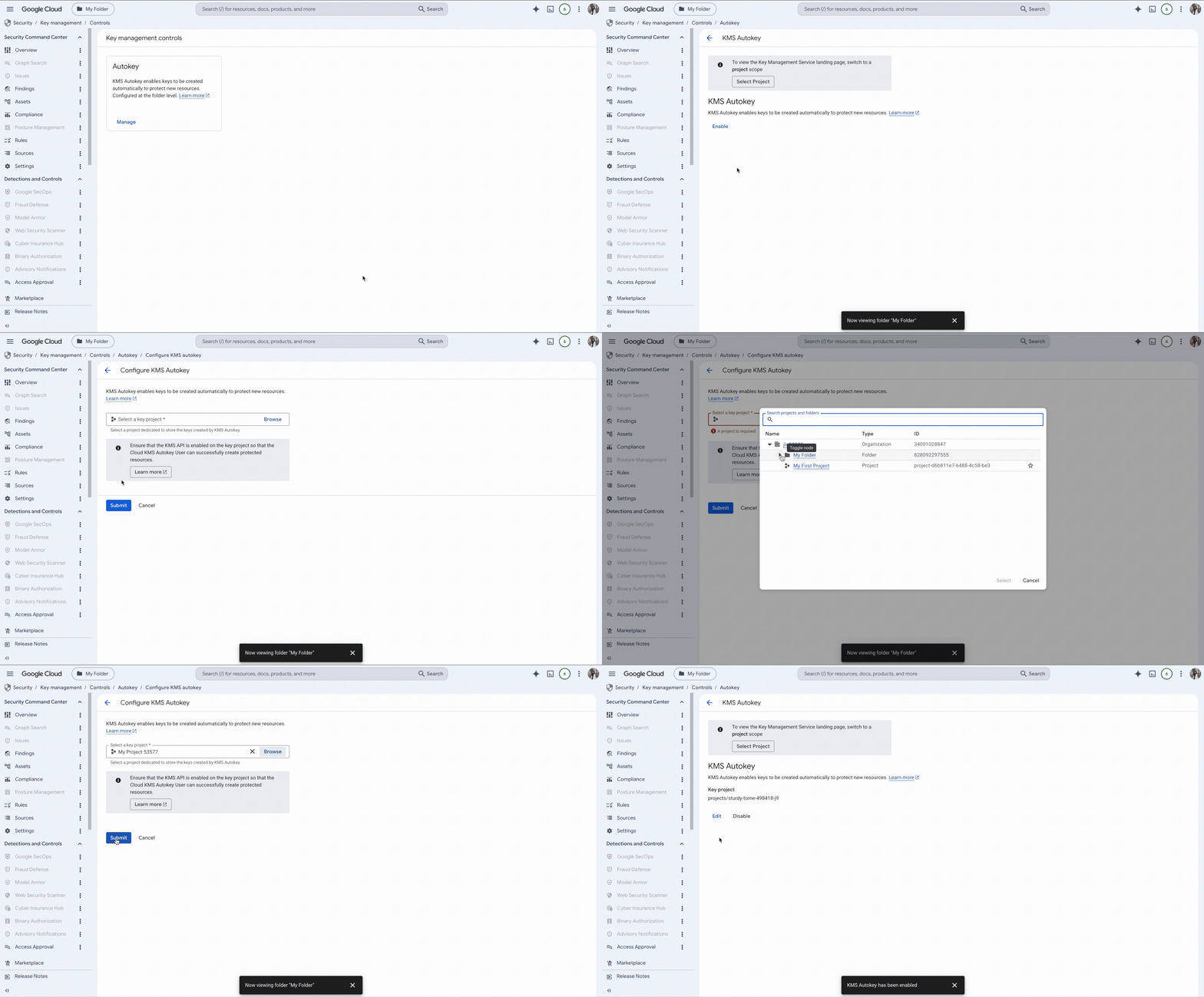
PRODUCT DEFINITIONENABLE CLOUD KMS AUTOKEY FEATUREAn Organization Admin can enable Autokey via Cloud Key Management Service on the organization or folder level (rather than project level, where resources are created). Child levels would acquire configs that parent levels had, unless specifically opted-in or out.
CREATE AND USE AUTOKEYSUsually, users would have to go to Key Management Service to create keys. However, using our reusable key picker component, we enable developers to easily create and use customer-managed encryption keys within their workflow. These Autokeys are automatically aligned to Google best practices.
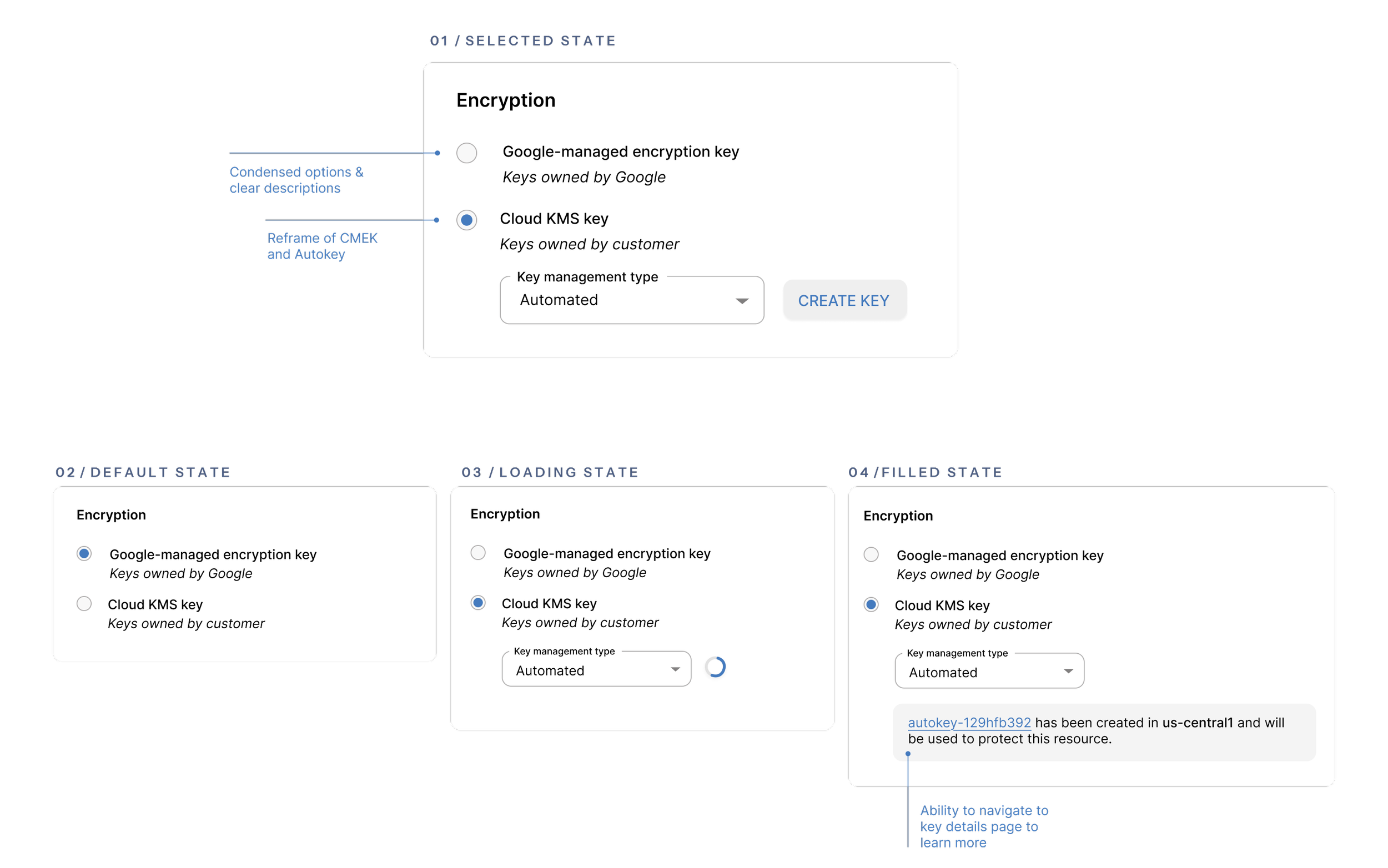
This component was and is still being integrated into different products and contexts across Google Cloud. A few examples:
Cloud Storage
Compute Engine
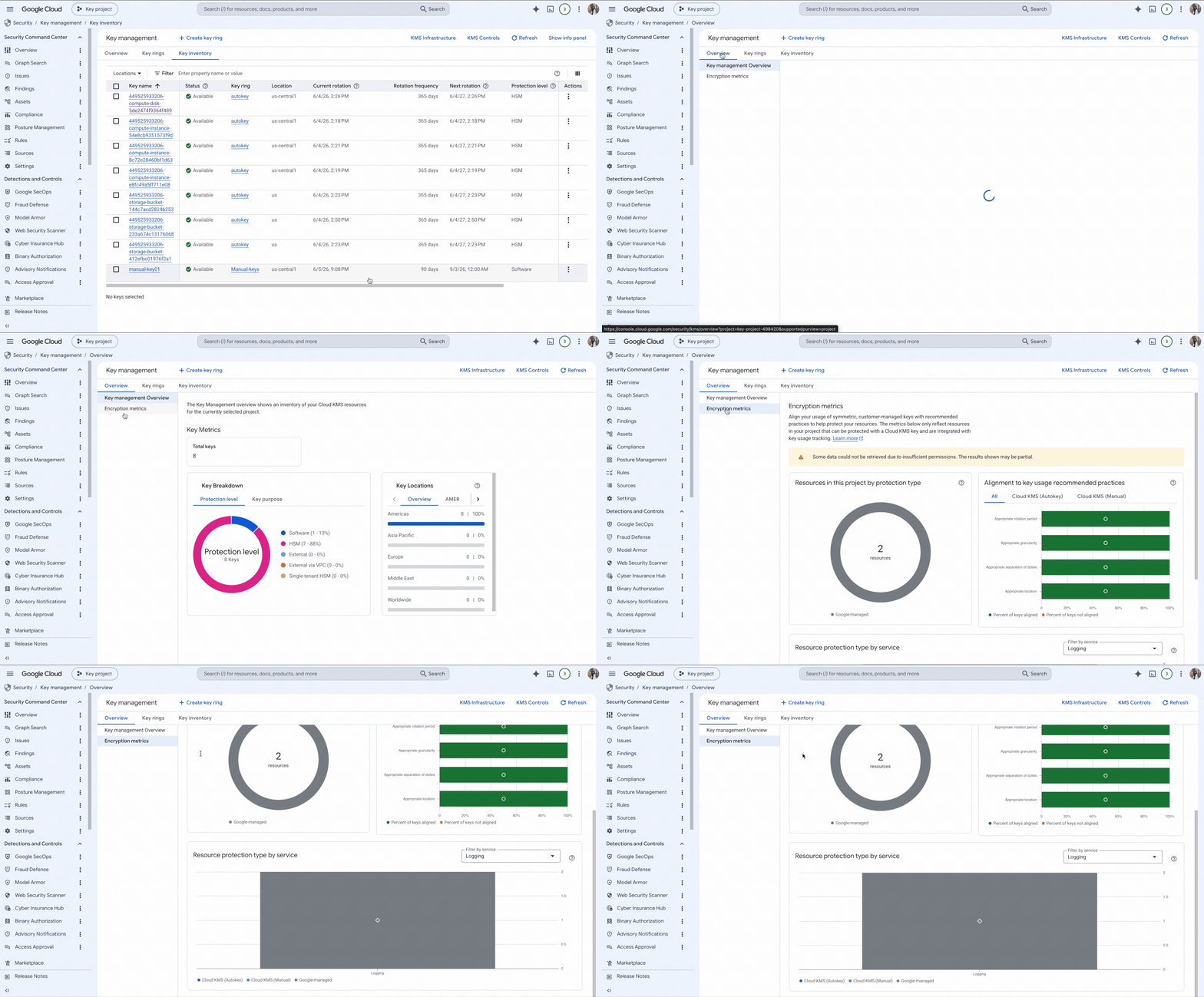
MANAGE AND MONITOR AUTOKEYSTo enable Key admins to manage and monitor Autokeys, we extended the existing capabilities of Key Management Service to include Autokeys, as well as creating new capabilities such as a Key health metrics dashboard.
MANAGE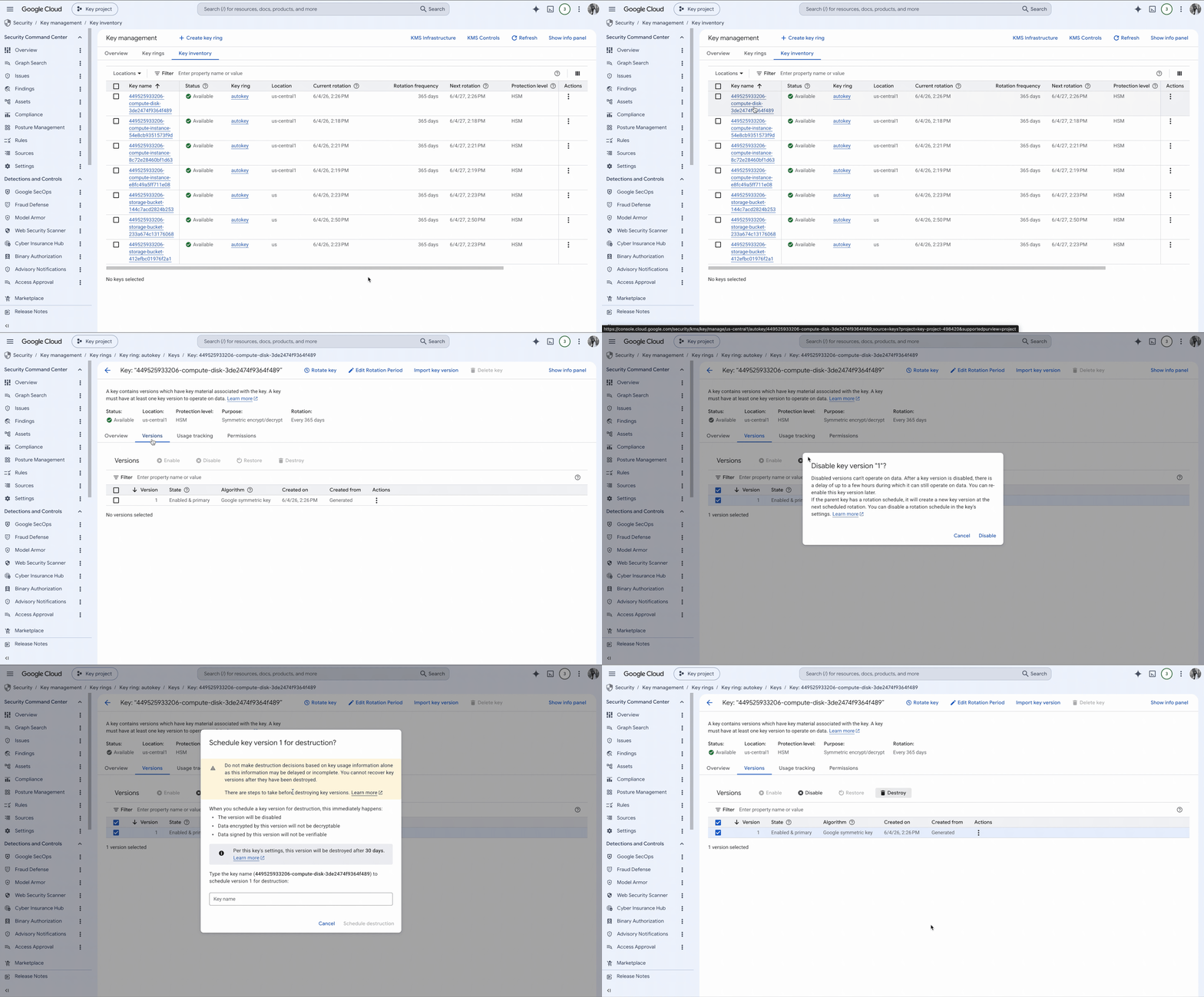
Within Key Management Service, Key admins are able to view their keys and perform key management operations such as enable/disable, rotate, or restore/ destroy key versions.
MONITORWithin Key Management Service, Key admins are also able to holistically view their Autokey and manual key inventory and health metrics.
DESIGN APPROACH04 - SPRINT
How might we reduce the complexity of encryption key creation so developers can create and use CMEK securely with minimal effort?
IDEATION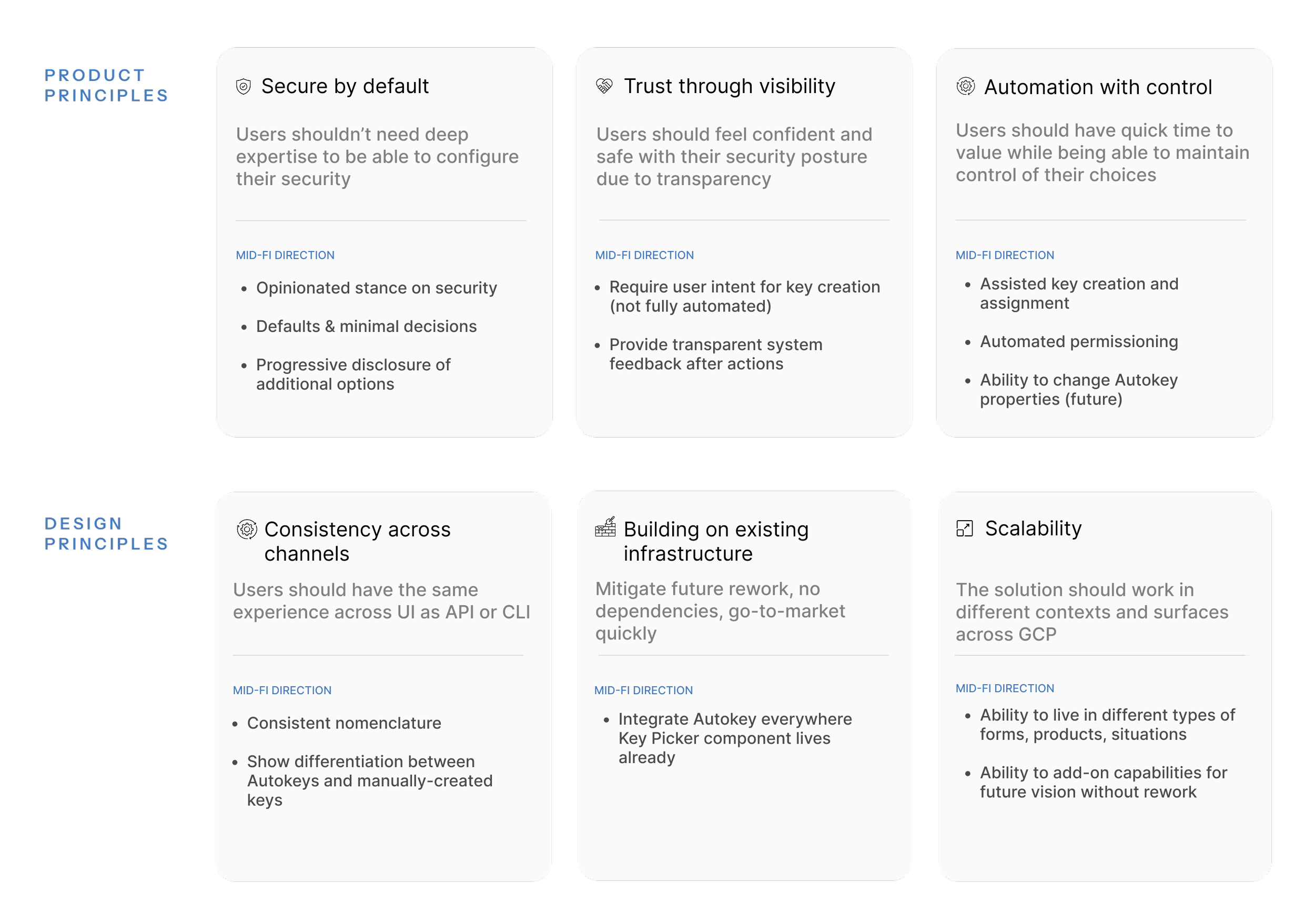
PRINCIPLES05 - SPRINT OUTCOME & KEY DECISIONSPRODUCT DEFINITIONAutokey upholds the security of separation of powers, while giving the developer a permissions to unblock themselves
When enabled by the Org admin, Cloud KMS Autokey is a feature that seamlessly allows developers to automatically create and assign a new customer-managed encryption key, aligned to Google best practices, to their resources. The system generates a scoped key aligned to Google’s best practices, attaches it to the resource, and grants appropriate permissions; therefore, eliminating the need for manual coordination.
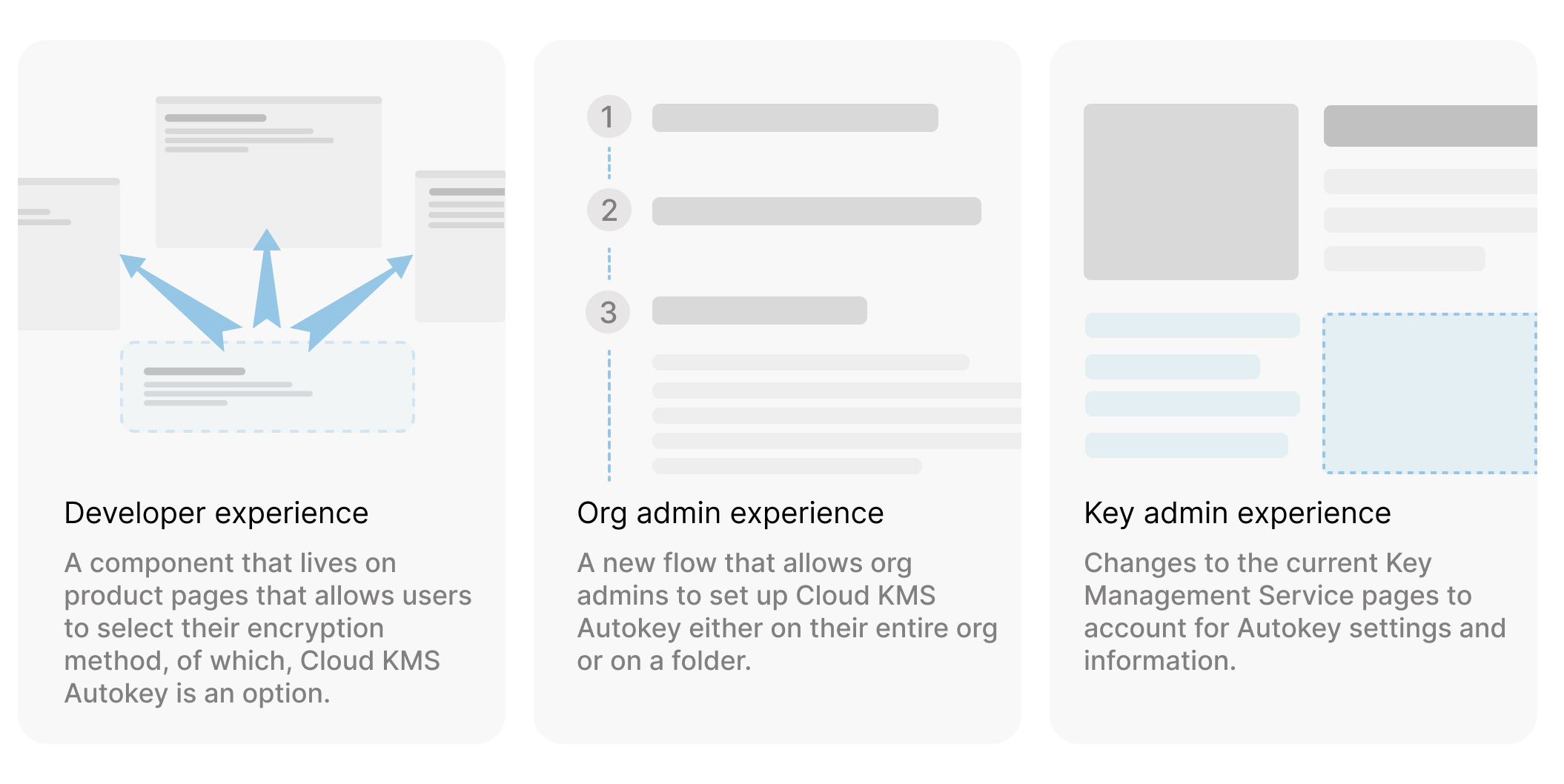
In theory, this is what the UX solution looks like is
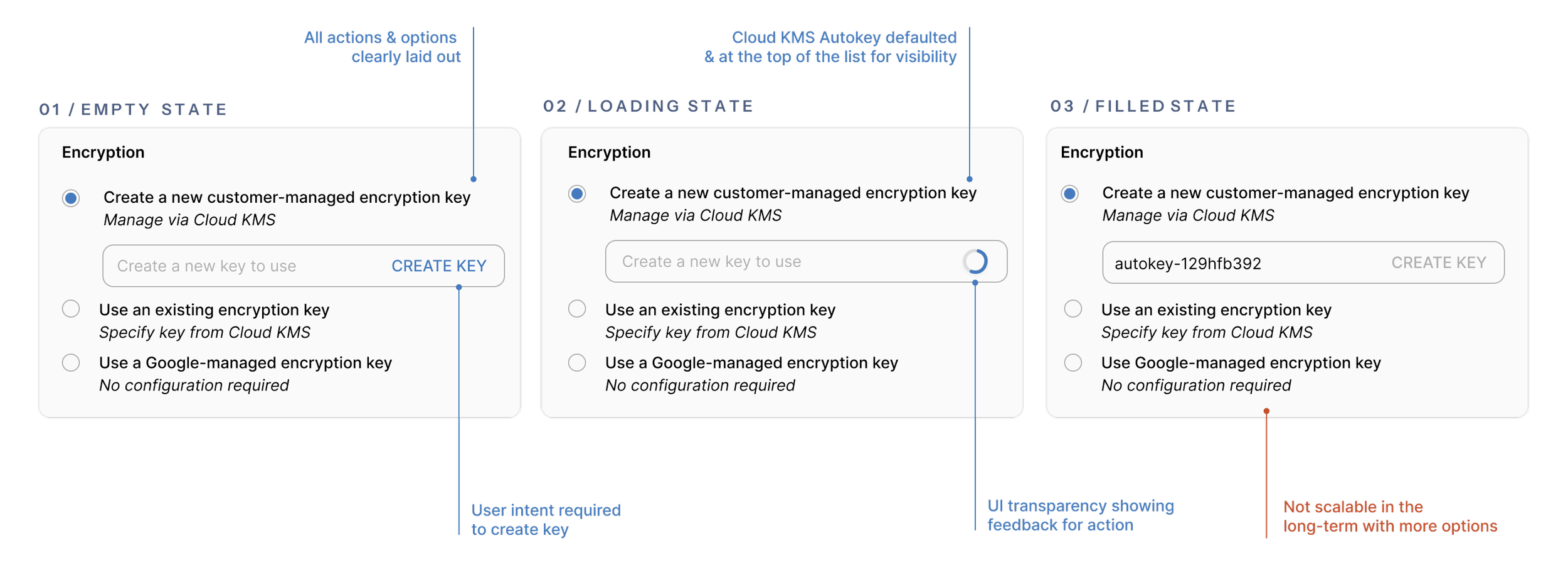
KEY DECISIONS→ AUTOMATION AND THE PROBLEM OF "CREEPINESS"We discussed how automated and how easy we should make Autokey creation for users. Originally we wanted to automatically create a new key on page load. At the end of the sprint, we decided to require user intent to create a new key in order to mitigate the problem of “creepiness” and the creation of many unused, billed keys.
→ INVISIBILITY OF SOLUTIONAs Autokey creation and management were automated, we discussed whether or not the configuration details needed to be shown to the user. We decided to show the Autokey & details for monitoring purposes, but differentiate them from manual keys using the naming structure.
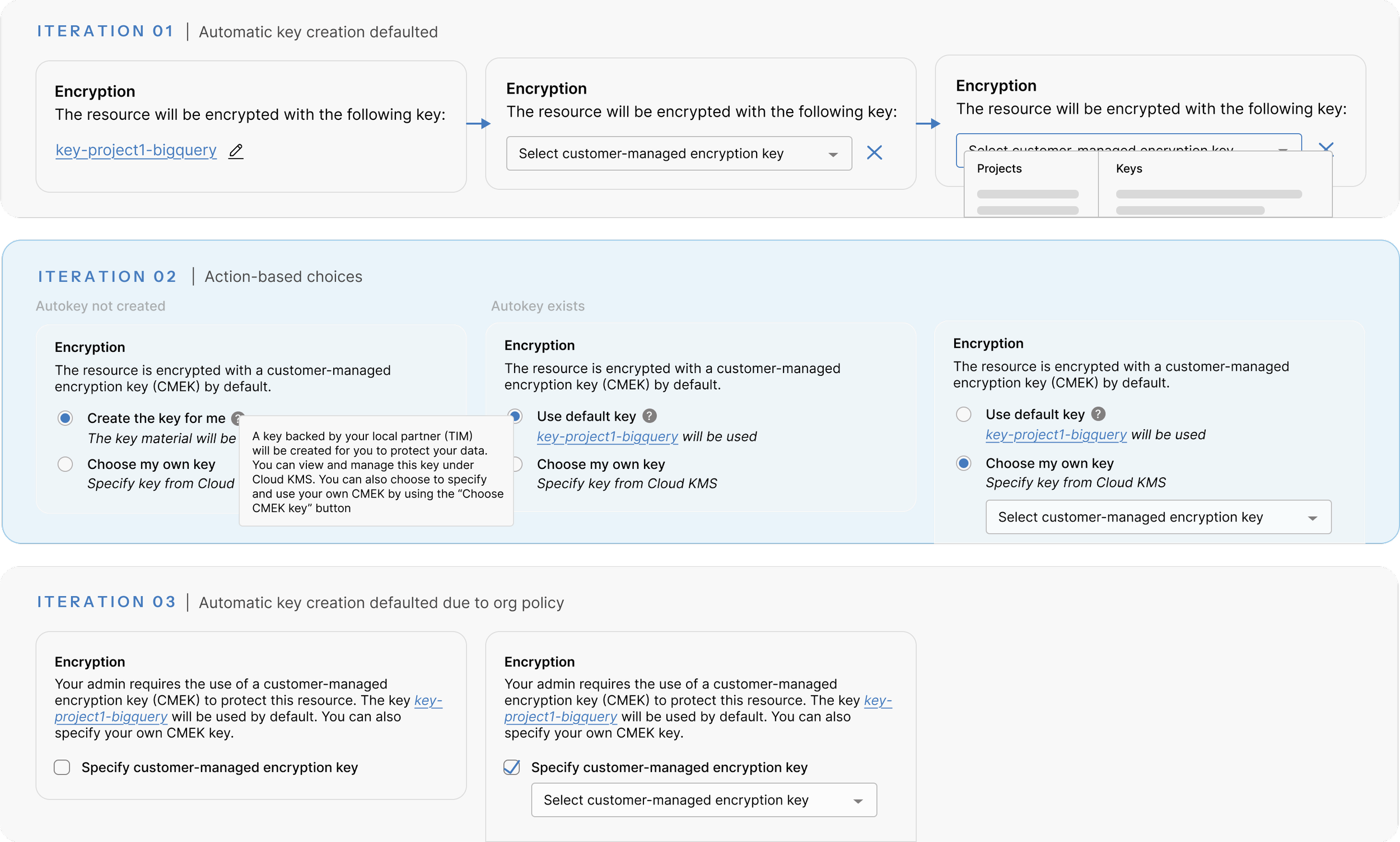
→ MID-FI DESIGN DIRECTIONBy rapid prototyping during the sprint, the team landed on iteration 2 as the most viable direction which laid out all options visibly and separated choices by action with a pre-created and defaulted key.
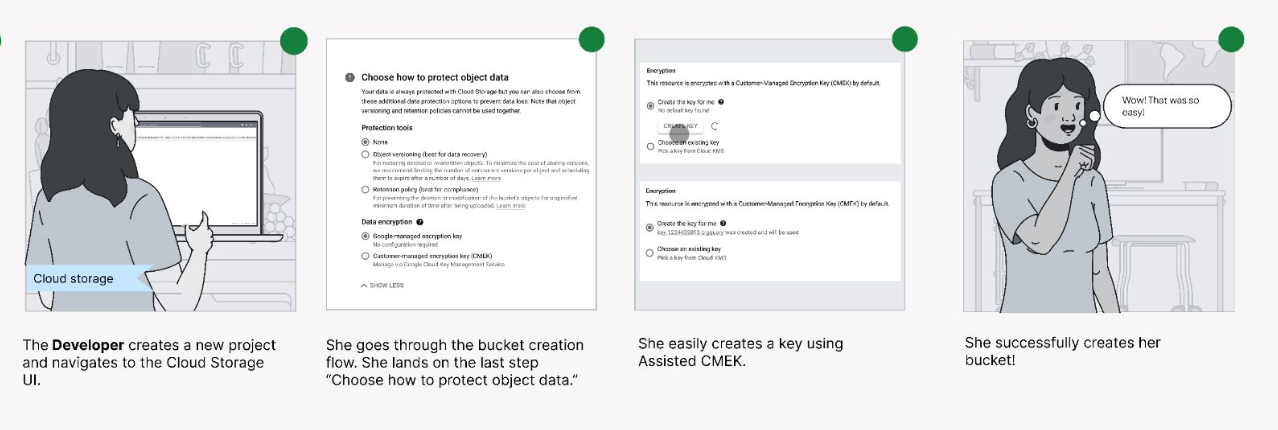
NEW USER JOURNEYDecreasing time to value from days to seconds, from 14 steps to 2.
06 - CONSTRAINTS & CHALLENGESDesign leadership and progress while facing significant organizational and technical challenges

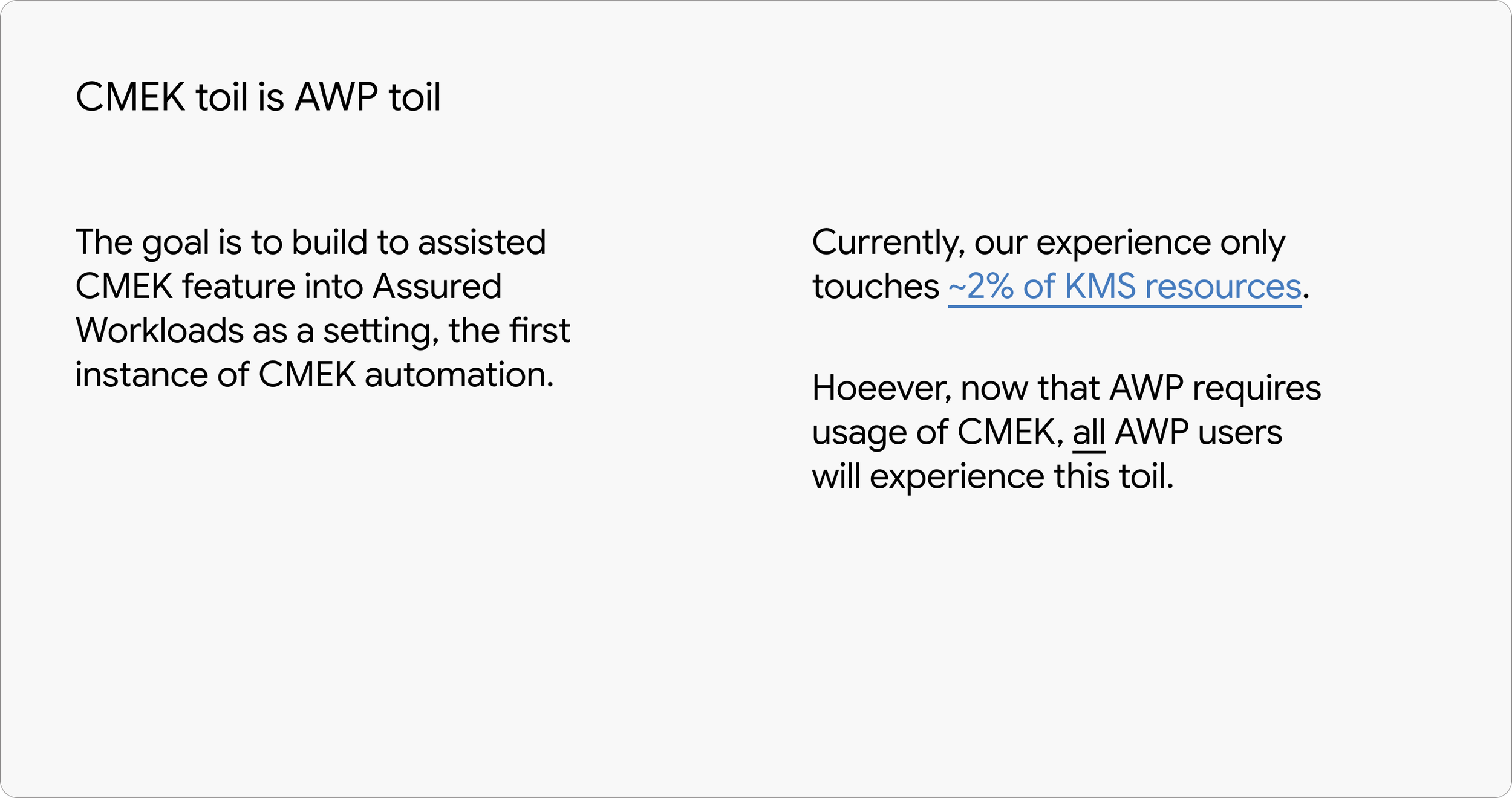
PRODUCT UNCERTAINTY & ADVOCACYIn order to get the integrator team (AWP) to reconsider deprioritizing our feature, I partnered with our Front-end and Back-end engineering leads to develop a deck highlighting the product impact and toil of deprioritizing this feature. I led the effort, presenting research, user impact, and conceptual mockups to clearly illustrate the experience with and without the feature.
PROGRESS WHILE AWAITING DECISION01 / BLUEPRINTINGWith the technical architecture redesign inflight and product timelines approaching, I created blueprints to track back-end design changes and their impact on the user experience. This helped align cross-functional stakeholders, resolve open questions, and keep evolving updates organized.
02 / USER STORIES & WIREFRAMESUsing the blueprint, I wrote user stories and created low-fidelity wireframes, sharing frequent iterations with engineering as they continued to define the technology. This allowed us to discuss feasibility, validate assumptions, and refine options collaboratively.
03 / OUTCOMEAfter a few meetings, the Assured Workload Partner team decided to add our feature back onto their roadmap so we proceeded as planned. Because the technical proof of concept initially relied on the AWP product for integration, our engineering team used the waiting period for a decision to redesign the architecture as a standalone solution.
07 - ITERATIONSAs the technical architecture was actively evolving, I worked closely with the cross-functional team from early wireframes and shared low-fidelity iterations to gather feedback. As the team dug deeper, we also moved away from automatic key creation on page load, since it could generate keys without user awareness and potentially result in hundreds of billed keys.
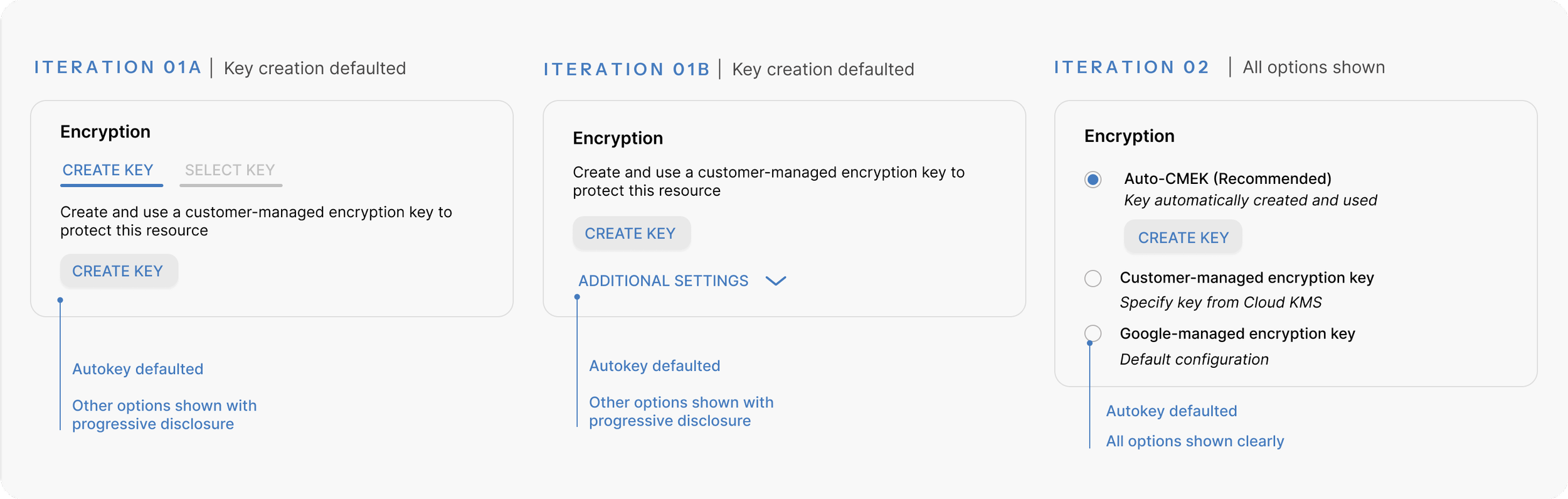
PRIVATE PREVIEW (MVP)To meet an aggressive private preview timeline, we intentionally optimized for clarity over long-term scalability. We recognized this approach wouldn’t scale long term; for example, adding edge cases like customer-supplied encryption keys would introduce too many options.
CONSIDERATIONS FOR GAUsed the private preview as a way to get feedback from stakeholders, integrator teams, and a closed group of customers.
INTEGRATOR FEEDBACKOriginally, we defaulted the encryption option to Autokey. Our integrator teams gave the feedback that our new feature blocked their creation flow due the Autokey creation being a required step. Due to the high traffic flow that they owned, we compromised and only defaulted Autokey if it was enabled.
PRODUCT RE-POSITIONINGI worked with our UX writer to figure out how to name and reposition the new feature in a way that moved it away from it’s old, “clunky”, and hard -to-use brand image. This not only affected the naming of the feature, but also how we wanted to frame it on the UI comparitively to Google-managed encryption since there were many dimensions we could call out from the control, to the manual vs. automated management, etc.
08 - TANGENTIAL WORK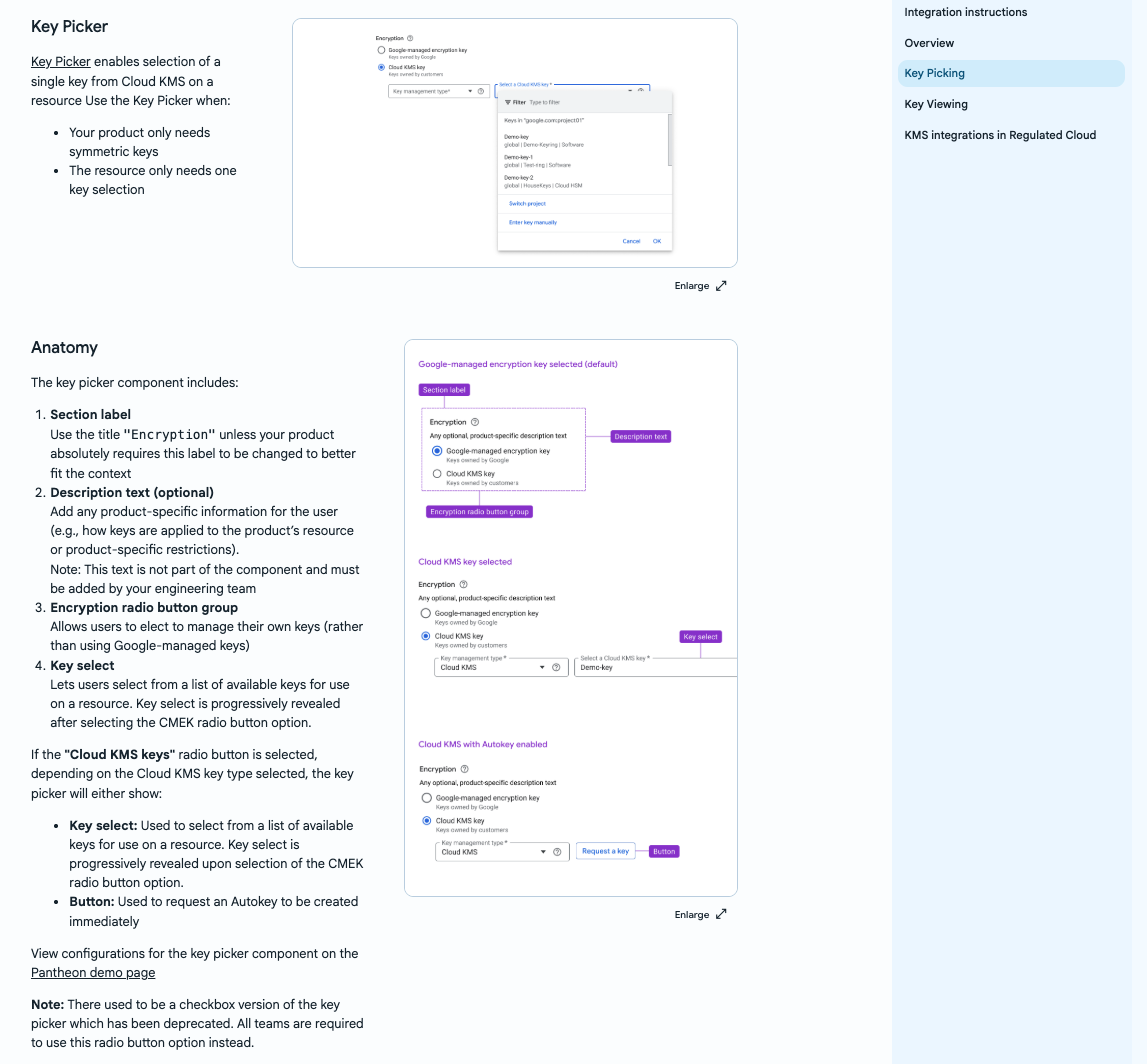
I owned and managed Cloud org-wide design system guideline pages for this Cloud KMS Autokey component which covered everything from anatomy and behavior to changes due to Regulatory Cloud regulations. This was referenced on average 2,000 times per year and used for alignment for cross-org, cross-functional integrator teams to reduce the overhead on our team.
SUBJECT-MATTER EXPERTISE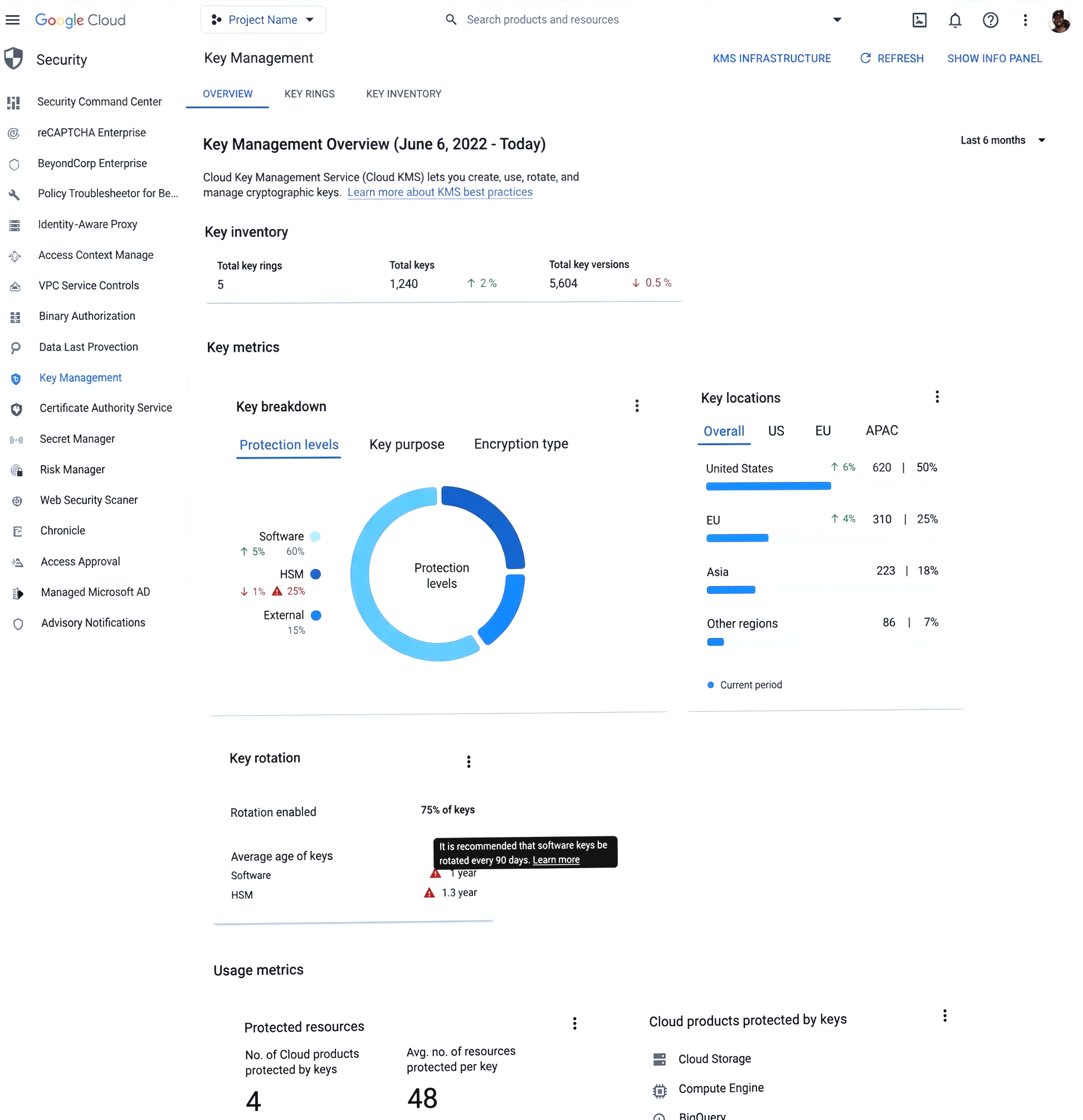
I designed and launched complimentary features that aid users in different parts of the key management lifecycle such as a Key Inventory Dashboard and a Encryption Health Dashboard. These are fed Cloud KMS Autokey metrics to help users with their security posture.
CLOUD-WIDE DESIGN SYSTEM GUIDELINES
COMPLIMENTARY FEATURESDue to the numerous edge cases and the complexity of different products throughout GCP, many cross-Cloud integrator teams needed a review of our component in their UI. As the subject-matter expert, I owned and triaged any UX bugs that integrator teams had & had to quickly learn and understand their product areas and questions in order to answer accordingly.